Vector Export Dialog
The spatial operation vector export dialog window allows the user to export one or more features to a new file. Vector Export will export the selected vector layer as a new shape file to the location specified in the Output File Path. The export process will reproject the layer into the specified coordinate system if different than the source file.
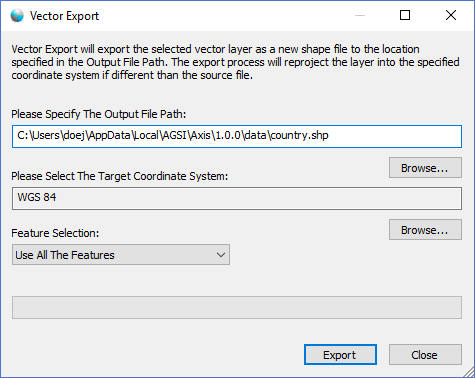
The dialog controls are:
- Please Specify The Output File Path
The file path that specifies the location of the output shape file. - File Path - Browse
When this button is clicked a file save dialog is displayed for the user to select the file path and file name of the output shape file. - Please Select The Target Coordinate System
A read-only text box that displays the currently selected target coordinate system. Use the Browse button to change the selection. - Target Coordinate System - Browse
When clicked the Coordinate System Dialog window is displayed allowing the user to select the target coordinate system. - Feature Selection
A dropdown list box that specifies what features in the selected layer to export. - Export
When this button is clicked the dialog exports the desired features to a new shape file in the target coordinate system. - Close
Closes the dialog window.
Documentation is published by LCIC with the Axis release and imported here in full. Screenshots and wording are the vendor's own.