Cloud File Menu
The cloud file menu control allows users to download and delete files from a cloud service directory. The right-click popup menu is accessible from the Cloud Pane tree control file nodes.
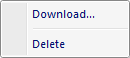
The popup menu items are:
-
Download
When this option is selected a Folder Browse Dialog window is displayed allowing the user to select a directory to download the file. -
Delete
Deletes the selected cloud service file.
Documentation is published by LCIC with the Axis release and imported here in full. Screenshots and wording are the vendor's own.