Metadata Page
The advanced tile options metadata page dialog window allows the user to set tile cache information properties.
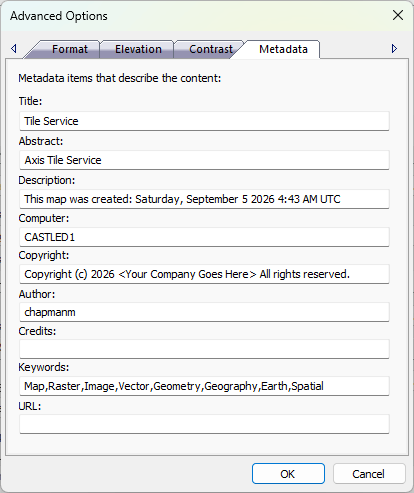
The dialog controls are:
- Title
A textbox that contains a brief title that uniquely identifies the tile cache. - Abstract
A textbox that contains a short description of the contents contained in the tiles cache. - Description
A textbox that conatins a more detailed description of the tile cache contents. - Computer
A textbox that identifies the computer name where the tile cache was created. - Copyright
A textbox that contains the copyright of the company that created the tile cache and / or tile cache contents. - Author
A textbox that identifies the author's name that created the tile cache. - Credits
A textbox that contains special credits to others from the author. - Keywords
A textbox that contains a comma seperated list of machine searchable keywords that help identify the tile cache. - URL
A textbox that contains a URL that points to other information on the web related to the tile cache. - OK
When this button is clicked all properties on the dialog pages are saved and the dialog window is closed. - Cancel
Closes the dialog window.
Documentation is published by LCIC with the Axis release and imported here in full. Screenshots and wording are the vendor's own.