Metadata Page
The advanced raster options metadata page dialog window allows the user to set file metadata property settings. File metadata are name / value pairs of information that provide more information about the image. Users can select predefined metadata tag names or create their own using this dialog page.
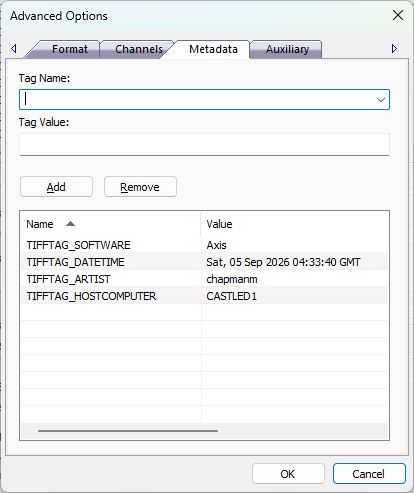
The dialog controls are:
- Tag Name
A drop down list box of pre-defined metadata tag names. Users can optionally type in custom tag names. Tag names depend on the output file format and the application will prepopulate some tags that are commonly used. The tag name is the unique identifier in the list of tags that identify the specific tag. - Tag Value
A textbox that contains the tag value associated with the tag name. - Add
When this button is clicked the dialog will add the Tag Name and Tag Value defined above to the tag list control. - Remove
When this button is clicked the dialog will remove the currently selected row in the tag list control. - Tag List
A list control that contains zero or more name / value pairs that are added to the output file image header. - OK
When this button is clicked all properties on the dialog pages are saved and the dialog window is closed. - Cancel
Closes the dialog window.
Documentation is published by LCIC with the Axis release and imported here in full. Screenshots and wording are the vendor's own.