Library Network Menu
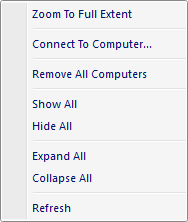
The popup menu items are:
-
Zoom To Full Extent
When this option is selected the active Map View is zoomed to the cumulative extent (minimum bounding rectangle) of the all the visible library servers. -
Connect To Computer
When this option is selected the Library Server dialog window is displayed allowing the user to connect to a Spatial Library Server. -
Remove All Computers
When this option is selected all Spatial Library Servers are removed from the library tree control. -
Show All
When this option is selected all Spatial Library Servers catalog datasets are made visible in the active Map View. -
Hide All
When this option is selected all Spatial Library Servers catalog datasets are made invisible in the active Map View. -
Expand All
Expands all sub nodes of the network node. -
Collapse All
Collapses all sub nodes of the network node. -
Refresh
When this option is selected all Spatial Library Server nodes are refreshed.
Documentation is published by LCIC with the Axis release and imported here in full. Screenshots and wording are the vendor's own.