Contrast Page
The advanced tile options contrast page dialog window allows the user to set the stretch algorithm to be used for visually enhancing image color contrast.
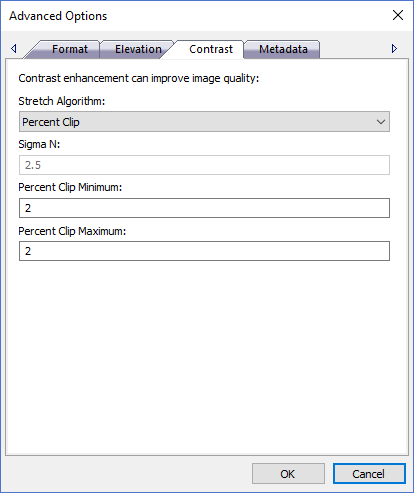
The dialog controls are:
- Stretch Algorithm
A drop down list box that contains a list of color space stretch algorithms. Stretch algorithms use statistics derived from the image histogram to visually enhance images. Histograms numerically describe the color distribution of the pixels throughout the image for the color range defined by the pixel data type. Stretch algorithms visually enhance the imagery by contrasting similar colors so they stand out more in the image. This is useful when an image is "hazy" looking or contains a lot of similar colors through out the image that all kind of blend together. - Sigma N
Numeric standard deviations multiplier. When using the Standard Deviations stretch algorithm use this number to increase or decrease the color space range. The standard deviations color space range is determined by adding the standard deviation value multiplied by the sigma n value to the right of the histogram center and subtracting the standard deviation value multiplied by the sigma n value to the left of the histogram center. The process is used to eliminate color values that don't appear very often in the image by clipping the edges of the histogram curve and reducing the color space range so remaining colors are spread evenly over the image. - Percent Clip Minimum
Numeric percent clip minimum value defines a percentage value to be clipped from the left hand side of the histogram curve. When using the Percent Clip stretch algorithm use this number to decrease the color space range by removing the bottom N percent of color values. - Percent Clip Maximum
Numeric percent clip maximum value defines a percentage value to be clipped from the right hand side of the histogram curve. When using the Percent Clip stretch algorithm use this number to decrease the color space range by removing the top N percent of color values. - OK
When this button is clicked all properties on the dialog pages are saved and the dialog window is closed. - Cancel
Closes the dialog window.
Documentation is published by LCIC with the Axis release and imported here in full. Screenshots and wording are the vendor's own.