Product Toolbar
The product toolbar control allows users to manage application settings and view application, licensing and product information and links.
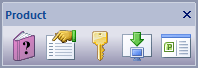
The toolbar buttons are:
- Help Guide
Displays the Help Window guide (this application) for the application where you can read about Map Publisher Desktop and how to use it.

- Application Settings
Displays the Application Settings Dialog window that allows users to configure application preferences.
- Product License
Displays the Product License Dialog window that allows users to activate the product and view the license status.
- Product Updates
Displays the Product Updates Dialog window allowing the user to check for product updates and new releases.

- About
Displays the About Dialog window for the application where you can read about the manufacturer, copyright and find product links.
Documentation is published by LCIC with the Axis release and imported here in full. Screenshots and wording are the vendor's own.