Find Dialog
The desktop find dialog window allows the user to search the Log Entry List for log entries that match a given search criteria.
Desktop Find Dialog
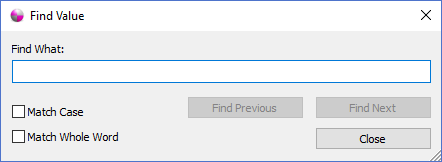
The dialog controls are:
- Find What
The search criteria to look for in the Log Entry List control. The find operation searches all the columns of the list and the log entry message text for a potential match. The cells or row with a match are highlighted in the list. The list will automatically scroll to the selected row as the search progresses through the list. - Match Case
Specifies that any matches have the same case as the Find What text. - Match Whole Word
Specifies that any matches match the entire Find What text. - Find Previous
Moves the selection in the list to the next match, if one exists, moving up the list. - Find Next
Moves the selection in the list to the next match, if one exists, moving down the list. - Close
Closes the Find Dialog window.
Documentation is published by LCIC with the Axis release and imported here in full. Screenshots and wording are the vendor's own.