Main Menu
The main menu docking window control allows you to execute the features of the application by selecting the action you wish to perform with either the mouse or keyboard. The main menu docking window is active when no Map Views are open.
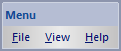
The popup menu items are:
- File
- New
Creates a new Map Document. - Open
Opens an existing Map Document. - Print Setup
Displays a Print Setup Dialog window that allows users to configure map document printing preferences. - Recently Opened Documents
A list of recently opened Map Documents that are opened when clicking on the menu item. - Exit
Shuts down the application and closes all windows.
- New
-
View
- Toolbars and Docking Panes
A checklist of Toolbars and docking window Panes that can be toggled on or off by clicking on the menu item. - Product License
Displays the Product License Dialog window that allows users to activate the product and view the license status. - Application Settings
Displays the Application Settings Dialog window that allows users to configure application preferences.
- Toolbars and Docking Panes
- Help
- Help Guide
Displays the Help Window guide (this application) for the application where you can read about Map Publisher Desktop and how to use it. - About Map Publisher
Displays the About Dialog window for the application where you can read about the manufacturer, copyright and find product links.
-
Documentation is published by LCIC with the Axis release and imported here in full. Screenshots and wording are the vendor's own.