General Page
The task details general page dialog window allows the user to view task information, status, instructions and task files and folders.
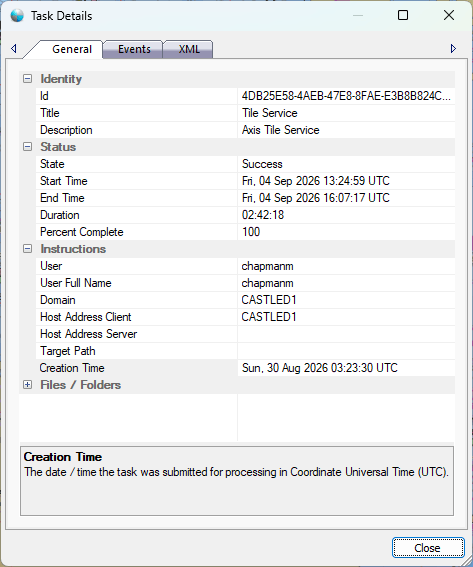
The dialog controls are:
Identity
- Id
The universally unique id of the task. - Title
A short, human readable identifier for the task. - Description
A short description that identifies the task operation in more detail.
Status
- State
Task status describes the state of the task as it moves through the parallel processing life cycle. The six task status state values are:
- Pending
The task has been submitted to the Queue service but has not yet been queued for the Load Balancer service. - Queued
The task has been queued with the Load Balancer service and is waiting to be processed by a Worker Node computer. - Processing
The task has been delivered to a Worker Node computer and is currently being processed. - Success
The task has completed succesfully. - Failed
The task has failed to complete successfully. - Cancelled
The task was cancelled prematurely by the user. - Clear On Close
If set to true the application will automatically clear the cache path when the application closes.
-
- Start Time
The time the task started processing in Coordinate Universal Time (UTC). - End Time
The time the task completed processing in Coordinate Universal Time (UTC). - Duration
The length of time the task was processing in the form of hours, minutes, seconds (HH::MM:SS). - Percent Complete
The percent complete for the task on a scale of 0 - 100.
Instructions
- User
The user name of the person that initiated the task. - User Full Name
The full name of the person that initiated the task if available. - Domain
The computer domain name of the user that initiated the task. - Host Address Client
The network computer name where the task was initially created. - Host Address Server
The network computer name where the task was eventually processed. - Target Path
The network path for the task output if required by the task process. - Creation Time
The time the task was queued with Parallel Processing Server for processing in Coordinate Universal Time (UTC).
Files / Folders
- Additional files and folders that may be required by the task process.
Buttons
- Close
Closes the dialog window.
Documentation is published by LCIC with the Axis release and imported here in full. Screenshots and wording are the vendor's own.