Geometric Envelope Dialog
The spatial operation geometric envelope dialog window allows the user to create envelope geometries from one or more features. The envelope, otherwise known as minimum bounding rectangle (MBR) or bounding box, is the smallest rectangle that encompasses the coordinates of a feature geometry. You can think of the envelope as the geometry you get by enclosing a set of geometries in a box.
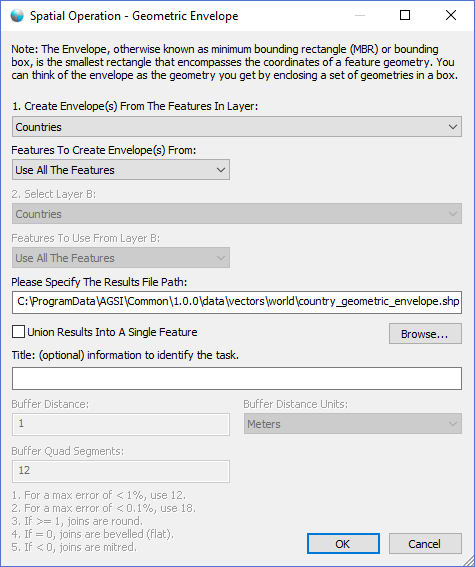
The dialog controls are:
- Create Envelope(s) From The Features In Layer
A dropdown list box that contains a list of geometry datasets in the active Map View window. - Features To Create Envelope(s) From
A dropdown list box that specifies what features in the selected layer to process. - Please Specify The Results File Path
The file path that specifies the location of the output results file. - File Path - Browse
When this button is clicked a file save dialog is displayed for the user to select the file path and file name of the output results file. - Union Results Into A Single Feature
Select this option if you want the resulting geometries to combined into one single geometry. - Title
A text string that will be displayed in the Task Pane window to help uniquely identify the task. - OK
When this button is clicked the dialog queues the Geometric Envelope task with the Parallel Processing Server and closes the dialog. Use the Task Pane window to monitor the task progress. A popup balloon window and the Task Pane will alert the user when the task is complete. - Cancel
Closes the dialog window.
Documentation is published by LCIC with the Axis release and imported here in full. Screenshots and wording are the vendor's own.