Format Page
The advanced tile options format page dialog window allows the user to set tile format property settings.
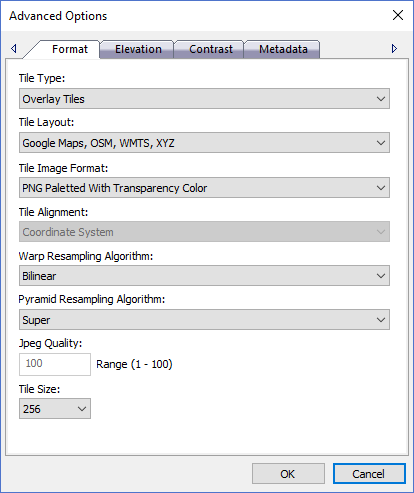
The dialog controls are:
- Tile Type
The tile type property specifies how the tiles will be added to the map in the html pages that are produced from the tile process. Base map tiles will lay beneath all other layers in the map while overlay tiles will be placed on top of the base map layers in the map. - Tile Layout
The tile layout property defines how the tiles will be layed out on disk for a given protocol or standard. Different tile standards dictate how the tiles are referenced within a grid of tiles. - Tile Image Format
A drop down list box of possible tile image formats for the output tile cache. Tile caches are heirarchies of small image files that fit together to make a larger image mosaic. Tile cache images are typically displayed in web browsers and therefore must be an image format that is supported by the browser. - Tile Alignment
A drop down list box of possible tile alignments for the tile cache. Tile caches that are aligned to the source imagery extents cover only the data that is encoded during the tile cache creation process. Tile caches that are aligned to the coordinate system cover the entire planet and allow tile caches to be updated or modified easier. Some tile viewing applications support one, the other or both alignments. When using the Coordinate System alignment only tiles that will have pixel data in them are produced but new tiles can be easily added later. - Warp Resampling Algorithm
A drop down list box of possible resampling algorithms that are used during the tile cache creation process when source imagery is re-projected (warped). Resampling is the process of resizing the image and how pixel color values are calculated when merging multiple source pixels into one output pixel. Nearest Neighbor is the fastest option and produces decent looking results while the other options are slower but produce better looking results. Bilinear or Cubic Convolution are recommended when processing elevation data because they preserve the original height values better than the other options. If the source imagery and the output tile cache are in the same coordinate system then re-projection will not occur and the warp resampling algorithm option will not be used. - Pyramid Resampling Algorithm
A drop down list box of possible resampling algorithms that are used during the tile cache creation process when source imagery is resized (scaled). Resampling is the process of resizing the image and how pixel color values are calculated when merging multiple source pixels into one output pixel. Nearest Neighbor is the fastest option and produces decent looking results while the other options are slower but produce better looking results. Bilinear or Cubic Convolution are recommended when processing elevation data because they preserve the original height values better than the other options. - Jpeg Quality
A numeric quality setting applicable only when using the jpeg tile image format. Valid range for the setting is 1 - 100 where 1 is the worse quality but fastest compression time and 100 is the best quality but slowest compression time. - Tile Size
The tile size in pixels for the tiles in the tile cache. Tile caches are heirarchies of small image files that fit together to make a larger image mosaic. All tiles in a tile cache have the same pixel dimensions. Smaller tile sizes produce more tile files that each cover smaller areas on the ground while larger tile sizes produce less tile files and cover more area on the ground. - OK
When this button is clicked all properties on the dialog pages are saved and the dialog window is closed. - Cancel
Closes the dialog window.
Documentation is published by LCIC with the Axis release and imported here in full. Screenshots and wording are the vendor's own.