Search Dialog
The cloud search dialog window searches for file paths in a cloud storage service that matches a given path prefix.
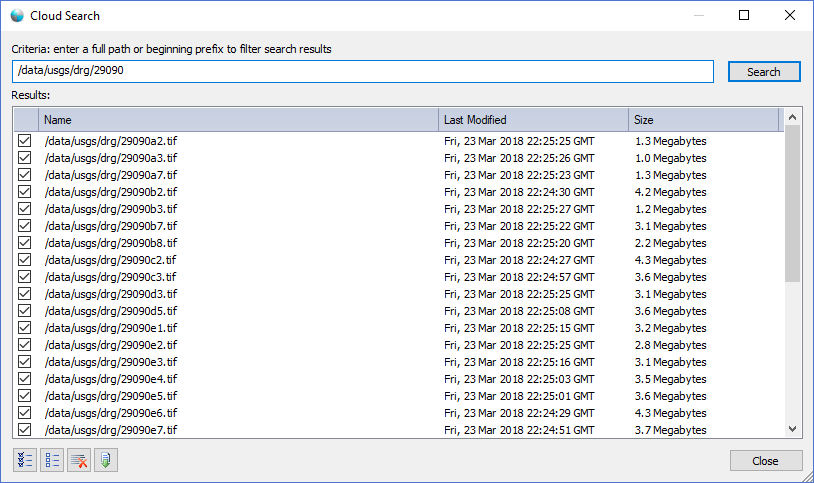
The dialog controls are:
- Criteria
The full path or beginning prefix to filter search results. Cloud services limit search criteria to a path prefix and return all files that begin with the prefix. - Search
Executes the search operation when clicked using the prefix specified in the Criteria text box. - Results
A list of results matching the path prefix in the Criteria text box where the Name column is the file path, Last Modified is the GMT date / time the file was last modified in the cloud storage and Size is the file size. Use the checkbox to select items for download. - Select All
Selects all the items in the Results list for downloading by checking the boxes in the left most column.
- Unselect All
Unselects all the items in the Results list for downloading by unchecking the boxes in the left most column.
- Clear Results
Removes all the list items in the Results list control.
- Download Selected Items
When clicked displays a directory browse dialog window so the user can specify a directory where the selected items in the Results list will be downloaded.
- Close
Closes the Cloud Search Dialog.
Documentation is published by LCIC with the Axis release and imported here in full. Screenshots and wording are the vendor's own.