Coordinate System Dialog
The map coordinate system dialog window allows the user to select a spatial reference system for the map.
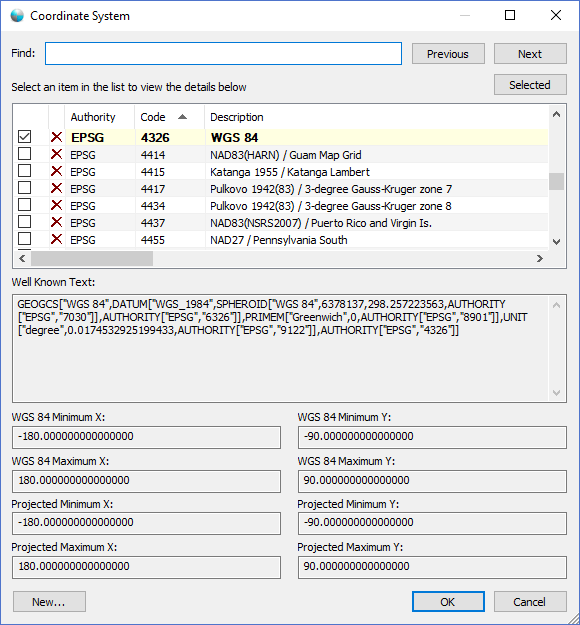
The dialog controls are:
- Find
A text value used to search the coordinate system list control with. As a user types into this control the list will advance to the first matching or partial matching value. - Previous
When this button is clicked the list will be scrolled up to the previous matching or partial matching occurence of the Find control value. - Next
When this button is clicked the list will be scrolled down to the next matching or partial matching occurence of the Find control value. - Selected
When the user clicks this button the list will be scrolled to the currently selected (checked) coordinate system. - Select an item in the list to view the details below
A list of supported coordinate systems. The checkbox indicates what coordinate system is currently selected. Only one row can be checked at any given time and the list enforces this. The X icon in each row can be used to delete an existing coordinate system. The Authority, Code, and Description columns designate the reference standards body that defines the coordinate system. - Well Known Text
The Open Geospatial Consortium (OGC) text representation for the selected coordinate system. - WGS 84 Minimum X
The valid minimum X value of the coordinate system in decimal degrees for the WGS 84 coordinate system. - WGS 84 Minimum Y
The valid minimum Y value of the coordinate system in decimal degrees for the WGS 84 coordinate system. - WGS 84 Maximum X
The valid maximum X value of the coordinate system in decimal degrees for the WGS 84 coordinate system. - WGS 84 Maximum Y
The valid maximum Y value of the coordinate system in decimal degrees for the WGS 84 coordinate system. - Projected Minimum X
The valid minimum X value of the coordinate system in the units of the currently selected coordinate system. - Projected Minimum Y
The valid minimum Y value of the coordinate system in the units of the currently selected coordinate system. - Projected Maximum X
The valid maximum X value of the coordinate system in the units of the currently selected coordinate system. - Projected Maximum Y
The valid maximum Y value of the coordinate system in the units of the currently selected coordinate system. - New
When this button is clicked the New Coordinate System dialog window is displayed where the user can create a new coordinate system. - OK
When this button is clicked the dialog updates the map control that launched the dialog and sets the objects coordinate system to the selected coordinate system in the list control. - Cancel
Closes the dialog window.
Documentation is published by LCIC with the Axis release and imported here in full. Screenshots and wording are the vendor's own.