Document Layer Vector Menu
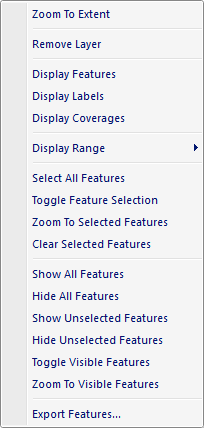
The popup menu items are:
- Zoom To Extent
Zooms the active map window to the extent (minimum bounding rectange) of the selected vector layer. -
Remove Layer
When this option is selected the selected vector layer is removed from the Document Pane tree control and from the active Map View. -
Display Features
When this option is selected the feature graphics for the selected vector layer are displayed in the map. -
Display Labels
When this option is selected the label graphics for the selected vector layer are displayed in the map. -
Display Coverages
When this option is selected the coverage graphics for the selected vector layer are displayed in the map. -
Display Range
When this option is selected a fly-out menu is displayed allowing the user to set the minimum and maximum scale levels that the layer should be visible in the active Map View. -
Select All Features
When this option is selected all the features are marked selected and highlighted with the selection color in the active Map View. -
Toggle Feature Selection
When this option is selected the feature selection is reversed so that unselected features are selected and selected features are unselected. -
Zoom To Selected Features
When this option is selected the active Map View is zoomed to the cumulative extent (minimum bounding rectangle) of the selected (highlighted) features. -
Clear Selected Features
When this option is selected all features are marked as unselected and the feature highlight is removed in the active Map View. -
Show All Features
When this option is selected all layer features are made visible in the active Map View. -
Hide All Features
When this option is selected all layer features are made invisible in the active Map View. -
Show Unselected Features
When this option is selected all layer features that are unselected are made visible in the active Map View. -
Hide Unselected Features
When this option is selected all layer features that are unselected are made invisible in the active Map View. -
Toggle Visible Features
When this option is selected the feature visibility is reversed so that invisible features are made visible and visible features are made invisible. -
Zoom To Visible Features
When this option is selected the active Map View is zoomed to the cumulative extent (minimum bounding rectangle) of the visible features. -
Export Features
When this option is selected the Vector Export Dialog window is displayed allowing the user to export one or more features to a new vector dataset file.
Documentation is published by LCIC with the Axis release and imported here in full. Screenshots and wording are the vendor's own.