Region Toolbar
The region toolbar control allows users to create region of interest geometries in the Map View.
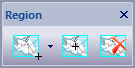
The toolbar buttons are:
- Select Rectangle ROI
When this button is clicked the active Map View is placed in Select Rectangle ROI mode allowing the user to sweep out a rectangle that defines a rectangle region of interest. Use the control-key to prevent the existing ROI from being removed while defining a new ROI. Use the down arrow on the right side of the button to display the Select Rectangle ROI Menu .

- Pick Feature ROI
When this button is clicked the active Map View is placed in Pick Feature ROI mode allowing the user to left click a feature in the Map View to use as the region of interest. The top-most intersecting feature is selected as the ROI. Use the control-key to prevent the existing ROI from being removed while defining a new ROI.

- Remove ROI
When this button is clicked the ROI is removed from the active Map View.
Documentation is published by LCIC with the Axis release and imported here in full. Screenshots and wording are the vendor's own.