General Page
The product settings general page dialog window allows the user to set application startup and tile caching properties.
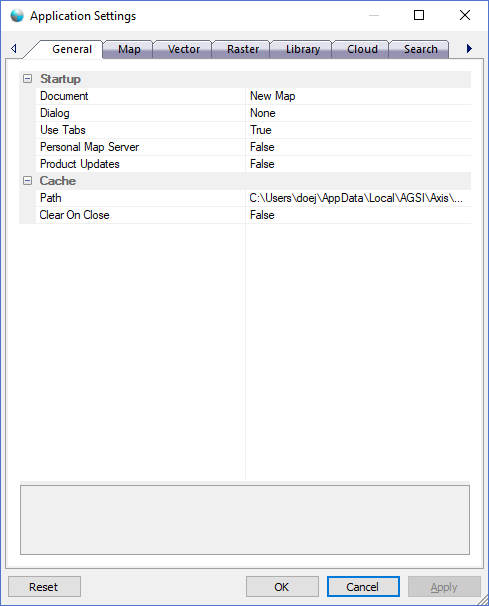
The dialog controls are:
Startup
- Document
The application will display the selected map document automatically on startup. - Dialog
The application will display the selected dialog automatically on startup. - Use Tabs
If set to true the application will display map documents using a tabbed view automatically on startup. - Personal Map Server
If set to true the application will automatically launch Personal Map Server on startup. - Product Updates
If set to true the application will automatically check for product updates on startup.
Cache
- Path
The root folder path where the application should save cached data. The application must have read / write access to the specified location. - Clear On Close
If set to true the application will automatically clear the cache path when the application closes.
Buttons
- Reset
When this button is clicked the dialog resets all properties on the current page to the original values that were present after product installation. - OK
When this button is clicked all properties on the dialog pages are saved and the dialog window is closed. - Cancel
Closes the dialog window. - Apply
When this button is clicked all properties on the dialog pages are saved but the dialog window is not closed.
Documentation is published by LCIC with the Axis release and imported here in full. Screenshots and wording are the vendor's own.