Cache Page
The desktop properties dialog window cache page allows users to specify if tile based services provided by the CGI or FastCGI modules listed on the Scripts Page should use a file based cache to improve performance. Producing images from geospatial data on demand can be process intensive. Tile services can work faster and service more concurrent users if they save image tiles to disk so they can be reused for subsequent requests.
Desktop Properties Dialog Cache
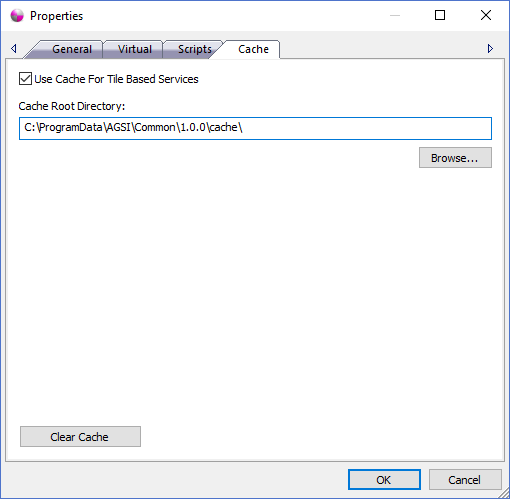
The dialog controls are:
- Use Cache For Tile Based Services
Check this option if you want tile based services to save imagery tiles to disk so they can be reused to service subsequent requests. - Cache Root Directory
The cache root directory path specifies the location where tile based services can store files like png and jpeg image tiles. Ideally the path should point to a directory located on fast disk to insure the best possible performance and scalability of the tile services. Tile services that cache tiles require READ and WRITE privileges for the cache root path to function properly. - Cache Root Directory Browse
Launches a directory browse window to select the Cache Root Directory path. - Clear Cache
When the Clear Cache button is clicked all files and sub-directories located under the Cache Root Directory path will be permanently deleted. This action cannot be undone which means the tile based services will have to rebuild their caches which can have a performance cost.
Documentation is published by LCIC with the Axis release and imported here in full. Screenshots and wording are the vendor's own.