Format Page
The advanced raster options format page dialog window allows the user to set file format property settings.
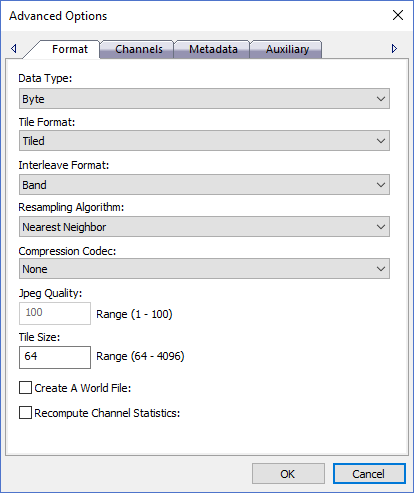
The dialog controls are:
- Data Type
The output file format data type. The dropdown list will default to the source file(s) original data type and then list any data types of smaller byte sizes. - Tile Format
A drop down list box of possible tile layouts for the selected output file format. Using a "Tiled" tile format is recommended for most users because it typically performs better under most circumstances. - Interleave Format
A drop down list box of possible channel (band) layouts for selected output file format. Band interleave stores all pixels for a given color band (channel) together whereas Pixel interleave stores all the bands for each pixel as an interleaved group. - Resampling Algorithm
A drop down list box of possible resampling algorithms for the selected output file format. Resampling is the process of resizing the image and how pixel color values are calculated when merging multiple source pixels into one output pixel. Nearest Neighbor is the fastest option and produces decent looking results while the other options are slower but produce better looking results. Bilinear or Cubic Convolution are recommended when processing elevation data because they preserve the original height values better than the other options. - Compression Codec
The file format specific pixel compression algorithm to use when creating the output file. Compression produces file sizes that can be much smaller than uncompressed files. Compressing files can result in data loss because in some cases pixel values may be changed during the compression and / or uncompress operations. - Jpeg Quality
A numeric quality setting applicable only when using the jpeg compression codec. Valid range for the setting is 1 - 100 where 1 is the worse quality but fastest compression time and 100 is the best quality but slowest compression time. - Tile Size
The file format specific internal tile size in pixels. Tile size ranges can change based on the file format and are usually factors of 2 such as 64, 128, 256, 512, 1024, 2048, etc. If the output image size is going to be large (greater than 1GB) then a larger tile size can improve reading and writing data to the file. If the image size is small then a large tile size can create file sizes that are bigger than needed and may waste disk space. - Create A World File
If this option is selected a text file with the same name as the output file name will be created with a .tfw extension that contains six double precision numbers that represent the affine transform for the image. The affine transform values are as follows:
- Pixel Size X (GSDX)
- Rotation about the Y axis (usually 0.0)
- Rotation about the X axis (usually 0.0)
- Pixel Size Y (GSDY)
- X coordinate of upper left pixel center
- Y coordinate of upper left pixel center
The values of the affine transform define the location, width, height and rotation of how an image is rendered onto a map. In other words, the area on the map where the image is located.
- Recompute Channel Statistics
Select this option if you want the color channel statistics such as minimum, maximum, mean, mode and standard deviation to be recomputed at the end of the process. Statistics help image viewers render the imagery better on a computer screen by enhancing color contrast and improving image quality. Statistics are essential when rendering imagery with greater than eight bits per band. - OK
When this button is clicked all properties on the dialog pages are saved and the dialog window is closed. - Cancel
Closes the dialog window.
Documentation is published by LCIC with the Axis release and imported here in full. Screenshots and wording are the vendor's own.