Spatial Relation Menu

The select relation menu control allows users to compare spatial relationships on vector datasets. The popup menu is accessible from the Spatial Toolbar Spatial Relation button.
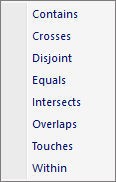
The popup menu items are:

  • Contains

    When this option is selected the Contains Dialog window is displayed.
  • Crosses

    When this option is selected the Crosses Dialog window is displayed.
  • Disjoint

    When this option is selected the Disjoint Dialog window is displayed.
  • Equals

    When this option is selected the Equals Dialog window is displayed.
  • Intersects

    When this option is selected the Intersects Dialog window is displayed.
  • Overlaps

    When this option is selected the Overlaps Dialog window is displayed.
  • Touches

    When this option is selected the Touches Dialog window is displayed.
  • Within

    When this option is selected the Within Dialog window is displayed.

Documentation is published by LCIC with the Axis release and imported here in full. Screenshots and wording are the vendor's own.