Folders Page
The publish folders folder page dialog window allows the user to add one or more network folder paths to be published as virtual directories on one or more Map Servers.
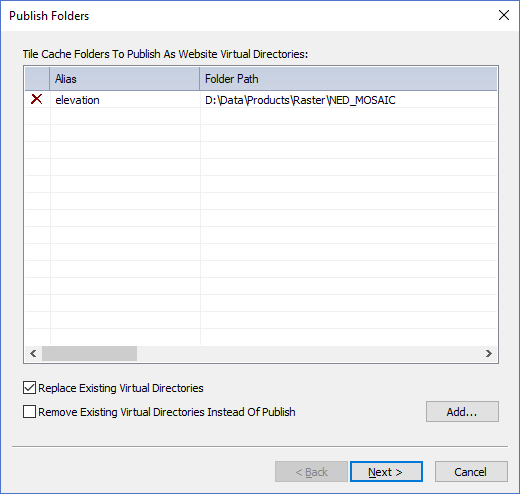
The dialog controls are:
- Tile Cache Folders To Publish As Website Virtual Directories
A list of tile cache folders to publish as virtual directories. Use the Add button to add folders to the list. Click on the X icon in the left most column of the list to remove items from list. When a virtual directory is published to a Map Server the contents of the folder become accessible on the Intranet / Internet for other users to access. To access the virtual directory from a web browser or other tool use the following convention:
"<protocol>://<address>:<port>/<alias> " where the parameters have the following meaning:
- <protocol> = http or https. required
- <address> = the host address of the server. required
- <port> = the host port number. optional if port number is 80
- <alias> = the alias of the virtual directory. required
An example is: https://127.0.0.1:7000/elevation
The http server will return the default index html page such as "index.html" that is in the root of the virtual directory if no other file or sub-directory is present after the alias name.
Important Note: Please be aware that all files and folders under a "Virtual Directory" directory path will be available to any person or machine that can access the IP address while the http service is running so it is highly recomended that you don't place any sensitive or private files under that location. For further protection of Personal Map Server please refer to the help guide documentation for Microsoft Firewall Service on the Microsoft website. A Firewall allows and blocks access to IP Addresses, port numbers and protocols in a secure way to help ensure unwanted visitors don't access services they are not allowed to use. If you are publishing to an Enterprise Map Server instance you can use the Microsoft IIS Manager application to fine tune virtual directories after they are published. - Replace Existing Virtual Directories
Check this option if you want virtual directories with the same "Alias" to be replaced with the ones in the list if they already exist. - Remove Existing Virtual Directories Instead Of Publish
Check this option to remove or "un-publish" the virtual directories in the list. Virtual directories that have matching alias names and folder paths will be removed from the Map Servers. - Add
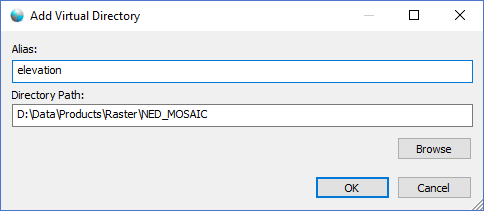
When this button is clicked the Add Virtual Directory dialog window (shown below) is displayed where users can enter an alias and a folder path to be added to the virtual directory list.
- Back
Disabled for this page because this is the first page in the publishing wizard. - Next
Validates the list contents and moves to the next page in the publishing wizard. - Cancel
Closes the Publish Folders Dialog.
Documentation is published by LCIC with the Axis release and imported here in full. Screenshots and wording are the vendor's own.