Raster Operations Menu
The raster operations menu control allows users to perform operations on raster datasets. The popup menu is accessible from the Raster Toolbar Raster Operations button.
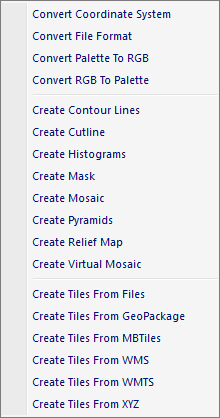
The popup menu items are:
- Convert Coordinate System
When this option is selected the Raster Convert Coordinate System Dialog window is displayed. - Convert File Format
When this option is selected the Convert File Format Dialog window is displayed. - Convert Palette To RGB
When this option is selected the Convert Palette To RGB Dialog window is displayed. - Convert RGB To Palette
When this option is selected the Convert RGB To Palette Dialog window is displayed. - Create Contour Lines
When this option is selected the Convert RGB To Palette Dialog window is displayed. - Create Virtual Mosaic
When this option is selected the Create Virtual Mosaic Dialog window is displayed. - Create Tiles From Files
When this option is selected the Create Tiles From Files Dialog window is displayed. - Create Tiles From GeoPackage
When this option is selected the Create Tiles From GeoPackage Dialog window is displayed. - Create Tiles From MBTiles
When this option is selected the Create Tiles From MBTiles Dialog window is displayed. - Create Tiles From WMS
When this option is selected the Create Tiles From WMS Dialog window is displayed. - Create Tiles From WMTS
When this option is selected the Create Tiles From WMTS Dialog window is displayed. - Create Tiles From XYZ
When this option is selected the Create Tiles From XYZ Dialog window is displayed.
Documentation is published by LCIC with the Axis release and imported here in full. Screenshots and wording are the vendor's own.