Mensuration Menu
The mensuration menu control allows users to measure area, features, geodesic paths, planimetric paths and rhumb paths. The popup menu is accessible from the Mensuration Toolbar Mensuration button.
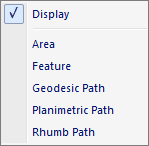
The popup menu items are:
-
Display
When this option is selected the measurment in the active Map View is toggled on or off allowing the user to show or hide the measurement without losing the geometry. - Area
When this option is selected the active Map View is placed in Mensuration Area mode allowing the user to define a polygon area by left clicking in the Map View window. Left click once for each point in the polygon. Left double click to close the polygon. Use the Mensuration Pane to view the measurements of the polygon. - Feature
When this option is selected the active Map View is placed in Mensuration Feature mode allowing the user to left click a feature in the Map View window. Left click on a feature to view the measurements in the Mensuration Pane. - Geodesic Path
When this option is selected the active Map View is placed in Mensuration Geodesic Path mode allowing the user to define a path in the Map View window. A geodesic path is the shortest path from point to point on a curved surface such as the Earth. Left click once for each point in the path. Left double click to end the path. Use the Mensuration Pane to view the measurements of the path. - Planimetric Path
When this option is selected the active Map View is placed in Mensuration Planimetric Path mode allowing the user to define a path in the Map View window. A planimetric path is the shortest path from point to point on a flat surface such as a cartesian plane. Left click once for each point in the path. Left double click to end the path. Use the Mensuration Pane to view the measurements of the path. - Rhumb Path
When this option is selected the active Map View is placed in Mensuration Rhumb Path mode allowing the user to define a path in the Map View window. A rhumb path or loxodrome is an arc crossing all meridians of longitude at the same angle, that is, a path with constant bearing as measured relative to true or magnetic north. Left click once for each point in the path. Left double click to end the path. Use the Mensuration Pane to view the measurements of the path.
Documentation is published by LCIC with the Axis release and imported here in full. Screenshots and wording are the vendor's own.