Maps Page
The publish folders folder page dialog window allows the user to add one or more network folder paths to be published as virtual directories on one or more Map Servers.
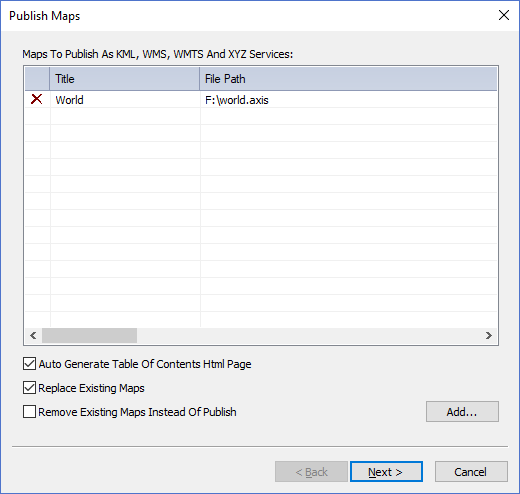
The dialog controls are:
- Maps To Publish As KML, WMS, WMTS And XYZ Services
A list of map files to publish. Use the Add button to add map files to the list. Click on the X icon in the left most column of the list to remove items from list. - Auto Generate Table Of Contents Html Page
Check this option if you want a table of contents html page to be auto-generated that displays links for each map file and virtual directory available on the map server. - Replace Existing Maps
Check this option if you want to replace existing map files with the same file name as a file name in the list. - Remove Existing Maps Instead Of Publish
Check this option to remove or "un-publish" the map files in the list. Map files that have matching file names will be removed from the Map Servers. - Add
When this button is clicked a select file dialog window is displayed where users can select an existing map file to be added to the list. - Back
Disabled for this page because this is the first page in the publishing wizard. - Next
Validates the list contents and moves to the next page in the publishing wizard. - Cancel
Closes the Publish Maps Dialog.
Documentation is published by LCIC with the Axis release and imported here in full. Screenshots and wording are the vendor's own.