Cloud Page
The product settings cloud page dialog window allows the user to set default properties settings for cloud service connections.
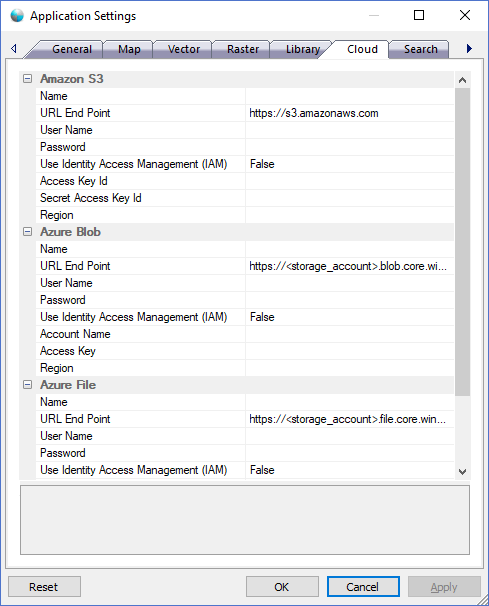
The dialog controls are:
Amazon S3
- Name
Default value. A user defined friendly name for the cloud service account when displayed in the Cloud Pane Tree Control. This value can be whatever the user desires and is a required field. - URL End Point
Default value. The url for the cloud storage service as specified by the service provider documentation. - User Name
Default value. The User Name for the URL End Point if required by the server. This is NOT the account name or access key id for the service account. This is the user name for a URL End Point that requires additional authentication and is typically an NTLM user name. - Password
Default value. The Password for the URL End Point if required by the server. This is NOT the access key or secret access key id for the service account. This is the password for a URL End Point that requires additional authentication and is typically an NTLM password. - Use Identity Access Management (IAM)
Default value. IAM is an enterprise-grade identity management system, federation and single sign-on service that large organizations will typically use in order to gain more control over user authentication. - Access Key Id
Default value. The access key for the cloud storage service account. Users should be supplied this value by the cloud service provider when they sign up for an account. - Secret Access Key Id
Default value. The secret access key for the cloud storage service account. Users should be supplied this value by the cloud service provider when they sign up for an account. - Region
Default value. The region for the cloud storage service account. Users should be supplied this value by the cloud service provider when they sign up for an account.
Azure Blob
- Name
Default value. A user defined friendly name for the cloud service account when displayed in the Cloud Pane Tree Control. This value can be whatever the user desires and is a required field. - URL End Point
Default value. The url for the cloud storage service as specified by the service provider documentation. - User Name
Default value. The User Name for the URL End Point if required by the server. This is NOT the account name or access key id for the service account. This is the user name for a URL End Point that requires additional authentication and is typically an NTLM user name. - Password
Default value. The Password for the URL End Point if required by the server. This is NOT the access key or secret access key id for the service account. This is the password for a URL End Point that requires additional authentication and is typically an NTLM password. - Use Identity Access Management (IAM)
Default value. IAM is an enterprise-grade identity management system, federation and single sign-on service that large organizations will typically use in order to gain more control over user authentication. - Account Name
Default value. The account name for the cloud storage service account. Users should be supplied this value by the cloud service provider when they sign up for an account. - Access Key
Default value. The access key for the cloud storage service account. Users should be supplied this value by the cloud service provider when they sign up for an account. - Region
Default value. The region for the cloud storage service account. Users should be supplied this value by the cloud service provider when they sign up for an account.
Azure File
- Name
Default value. A user defined friendly name for the cloud service account when displayed in the Cloud Pane Tree Control. This value can be whatever the user desires and is a required field. - URL End Point
Default value. The url for the cloud storage service as specified by the service provider documentation. - User Name
Default value. The User Name for the URL End Point if required by the server. This is NOT the account name or access key id for the service account. This is the user name for a URL End Point that requires additional authentication and is typically an NTLM user name. - Password
Default value. The Password for the URL End Point if required by the server. This is NOT the access key or secret access key id for the service account. This is the password for a URL End Point that requires additional authentication and is typically an NTLM password. - Use Identity Access Management (IAM)
Default value. IAM is an enterprise-grade identity management system, federation and single sign-on service that large organizations will typically use in order to gain more control over user authentication. - Account Name
Default value. The account name for the cloud storage service account. Users should be supplied this value by the cloud service provider when they sign up for an account. - Access Key
Default value. The access key for the cloud storage service account. Users should be supplied this value by the cloud service provider when they sign up for an account. - Region
Default value. The region for the cloud storage service account. Users should be supplied this value by the cloud service provider when they sign up for an account.
Buttons
- Reset
When this button is clicked the dialog resets all properties on the current page to the original values that were present after product installation. - OK
When this button is clicked all properties on the dialog pages are saved and the dialog window is closed. - Cancel
Closes the dialog window. - Apply
When this button is clicked all properties on the dialog pages are saved but the dialog window is not closed.
Documentation is published by LCIC with the Axis release and imported here in full. Screenshots and wording are the vendor's own.