Map Toolbar
The map toolbar control allows users to set map properties and publish maps and tile cache folders to the Personal and Enterprise Map Servers.
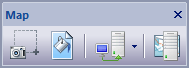
The toolbar buttons are:
- Save Map Image
When this button is clicked a File Save As Dialog window is displayed allowing the user to save the image in the active Map View to an image file.

- Set Map Background Color
When this button is clicked a Color Dialog window is displayed allowing the user to set the background color of the map in the active Map View.

- Publish To Map Server
When this button is clicked the Publish To Map Server Menu is displayed allowing the user to publish either maps or tile cache folders to one or more Personal and / or Enterprise Map Servers.
- Map Server
When this button is clicked the Personal Map Server Desktop window is launched allowing the user to publish maps and tile cache folders to users on the Intranet / Internet.
Documentation is published by LCIC with the Axis release and imported here in full. Screenshots and wording are the vendor's own.