Create Tiles From XYZ Dialog
The raster operation create tiles from xyz dialog window allows the user to create a static tile cache from one more OSM XYZ service layers.
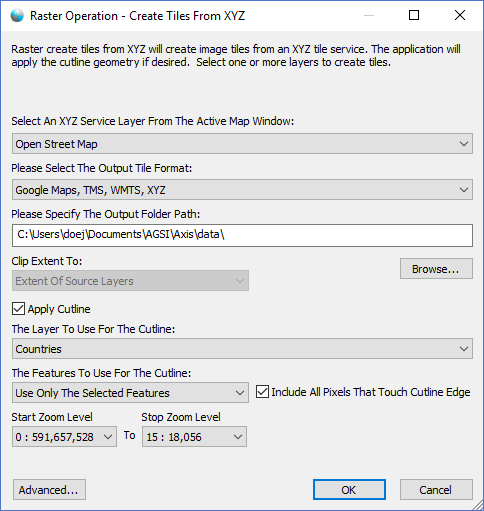
The dialog controls are:
- Select An XYZ Service Layer From The Active Map Window
A dropdown list control that displays a list of XYZ Service layers in the active Map Viewthat can be exported. - Please Select The Output Tile Format
A dropdown list control that displays the supported output static tile cache formats. - Please Specify The Output Folder Path
The file or folder path (depending on the Output Tile Format) where the static tile cache should be created. - Output Folder Path - Browse
When clicked a file or folder (depending on the Output Tile Format) browse dialog window is displayed allowing the user to select the output file or folder path. - Clip Extent To
A drop down list box that contains a list of clipping options. If a Region Of Interest is defined in the active Map View it will be added as an option in the list. - Apply Cutline
Select this option to apply a cutline to the tile cache. Cutlines are used to null out pixels that are outside the area of one or more geometries. - The Layer To Use For The Cutline
A drop down list box that contains a list of polygon vector layers in the Map View window that can be used as a cutline source for the operation. - The Features To Use For The Cutline
A drop down list box that specifies what features from the selected cutline layer to use for processing. Select "Use All The Features" option to use all the geometries in the layer for the cutline. Select "Use Only The Selected Features" option to only use the features that are selected in the layer for the cutline. Select "Use Only The Visible Features" option to only use the features that are visible in the layer for the cutline. - Include All Pixels That Touch The Cutline Edge
Select this option to include all pixels in the tile cache that intersect or are completely within the interior of the cutline geometry. Pixels that do not intersect the cutline geometry will be nulled out (set to transparent). If this option is not selected then only the pixels that are completely contained within the cutline geometry will be included and partially intersecting pixels will be nulled out. - Start Zoom Level
A drop down list box that contains a list of tile cache zoom levels. The start zoom level determines what zoom level is the first level produced by the operation. - Stop Zoom Level
A drop down list box that contains a list of tile cache zoom levels. The stop zoom level determines what zoom level is the last level produced by the operation. - Advanced
When clicked the Advanced Tile Options Dialog window is displayed allowing the user to specify additional options for the operation. - OK
When this button is clicked the dialog queues the Create Tiles From XYZ task with the Parallel Processing Server and closes the dialog. Use the Task Pane window to monitor the task progress. A popup balloon window and the Task Pane will alert the user when the task is complete. - Cancel
Closes the dialog window.
Documentation is published by LCIC with the Axis release and imported here in full. Screenshots and wording are the vendor's own.