Properties Pane
The properties pane docking window allows users to view and edit layer properties such as title, visibility, pen style, fill style, label style, coordinate system and much more.
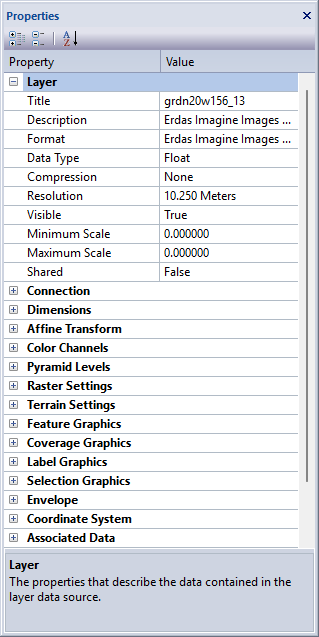
Overview
The properties pane docking window allows users to view layer specific metadata. Property groups vary depending on the type of data the layer represents, such as vector, raster, elevation or point cloud. All layer types have basic information such as map scale, connection string and coordinate system information. Some properties are read-only and cannot be edited, while other properties can be modified and saved in the map file from application session to session.
Dialogs
Toolbar
- Expand All
Expands all property groups of the property pane.

- Collapse All
Collapses all property groups of the property pane.

- Sort Alphabetically
Toggles the properties list order between sorted property groups and sorted individual items.
Docking Window
Dockable panes are special windows that can either be docked in a dock site or included in a tabbed pane. The main difference with a view is that a view is built to display the main application content while a pane provides context relative content to what the view has. When a pane is docked in a tabbed pane, click and drag the tab title to rip it from the tabbed view. Drop the cursor on the docking targets that appear when dragging to dock in a new location. Use the "Pin" menu icon in the title bar of the pane window to auto show / hide the pane when not in use. Use the Main Menu, Map Menu or Panes Toolbar to show or hide the application docking windows.
Documentation is published by LCIC with the Axis release and imported here in full. Screenshots and wording are the vendor's own.