Virtual Page
The desktop properties dialog window virtual page allows users to specify virtual directory alias names and directory paths. Virtual Directories behave like Home Directories where users can host additional websites like tile cache folders.
Desktop Properties Dialog Virtual
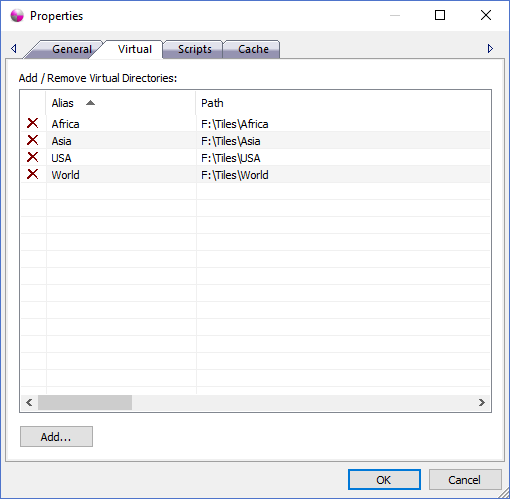
The dialog controls are:
- Add / Remove Virtual Directories
Displays a list of virtual directories that are made available when the http service is running. To request a virtual directory from a web browser address bar a user would specify an address like http://127.0.0.1:7000/Africa to request the default document that resides in the Path F:\Tiles\Africa. Users can sort the list ascending and descending by clicking on a column header and remove Virtual Directories from the list by clicking the red X icon in each row.
Important Note: Please be aware that all files and folders under a "Virtual Directory" directory path will be available to any person or machine that can access the IP address while the http service is running so it is highly recomended that you don't place any sensitive or private files under that location. For further protection of Personal Map Server please refer to the help guide documentation for Microsoft Firewall Service on the Microsoft website. A Firewall allows and blocks access to IP Addresses, port numbers and protocols in a secure way to help ensure unwanted visitors don't access services they are not allowed to use. - Add...
When the Add... button is clicked the Add Virtual Directory Dialog window is displayed. The values of the Alias and Directory Path are added to the Virtual Directory list control when the OK button is clicked.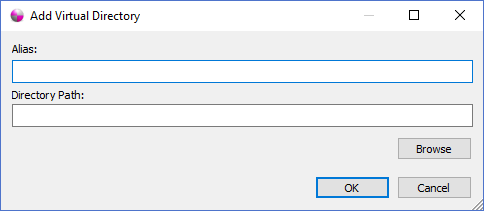
Documentation is published by LCIC with the Axis release and imported here in full. Screenshots and wording are the vendor's own.