License Dialog
The product license dialog window allows a user to specify a product license key or check the current license status.
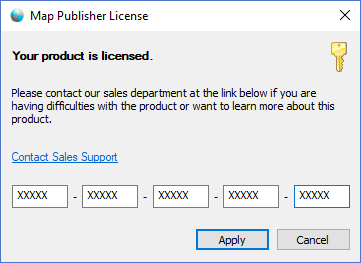
The dialog controls are:
- License Status
Specifies the status of the license if in trial mode, expired or licensed . - Links
A hyperlink to the manufacturer website for more information about product licensing. - Product License
Five text boxes that accept a twenty five character, alpha-numeric code that defines a product license. When a user purchases a valid license of Map Publisher Professional they are issued a product license key. - Apply
When this button is clicked the dialog will validate the key. If the key is valid the product license status will be updated to "licensed" status and the dialog window will be closed. If the key is not valid a message box will be displayed to alert the user.
Documentation is published by LCIC with the Axis release and imported here in full. Screenshots and wording are the vendor's own.