Server Dialog
The library server dialog window allows the user to connect to a Spatial Library Server instance either on the local machine or a remote machine.
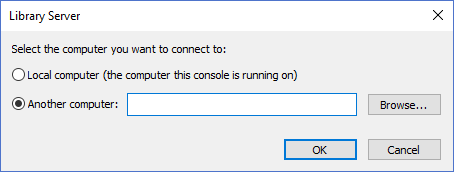
The dialog controls are:
- Local computer
Select this option if you want to connect to the Spatial Library Server on the same machine. - Another computer
Select this option if you want to connect to the Spatial Library Server on a remote machine. - Another computer - text box
A text box the user can manually type in the remote computer name to connect to. - Browse
When the button is clicked the Network Browse dialog window is displayed allowing the user to select the computer from a list of computers on their network. - OK
When this button is clicked the dialog attempts to connect to the Spatial Library Server that is running on the server specified. If the connection attempt is successful the dialog window will be closed and the server name will appear in the Library Pane Tree Control. If the connection fails make sure that the Spatial Library Server is installed and running on the machine specified. - Cancel
Closes the dialog window.
Documentation is published by LCIC with the Axis release and imported here in full. Screenshots and wording are the vendor's own.