Cloud Service Group Menu
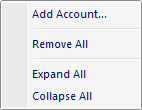
The popup menu items are:
-
Add Account
When this option is selected the Cloud Service Account Dialog window is displayed allowing the user to connect to a cloud storage service account. -
Remove All
When this option is selected all cloud storage service accounts under the selected service group node are removed. -
Expand All
Expands all sub nodes that have been previously expanded using the + icon in the cloud storage tree control. Use the plus icons in the cloud storage tree control to retrieve the cloud contents before using this menu option. -
Collapse All
Collapses all sub nodes that have been previously expanded using the + icon in the cloud storage tree control. Use the plus icons in the cloud storage tree control to retrieve cloud contents before using this menu option.
Documentation is published by LCIC with the Axis release and imported here in full. Screenshots and wording are the vendor's own.