Application Overview
Map Publisher Desktop is a geospatial data processing, authoring and dissemination program. Users author maps using the desktop application and then publish the content via industry standard protocols and formats so other map users on your Intranet / Internet can access it.
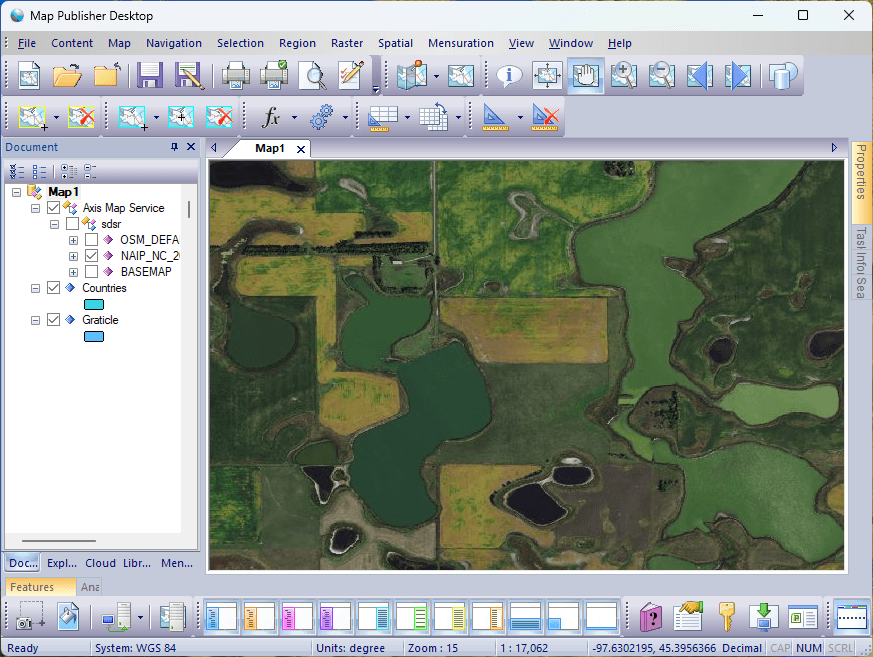
Map Publisher Professional contains several server and desktop applications but the primary user interface for the entire suite of products is Map Publisher Desktop. Users can interact with the Parallel Processing Server, Spatial Library Server, Personal Map Server and the Enterprise Map Server using the docking panes, toolbars, menus and dialogs in the Map Publisher Desktop application. The diagram below illustrates a high level overview of publishing maps using the desktop application:
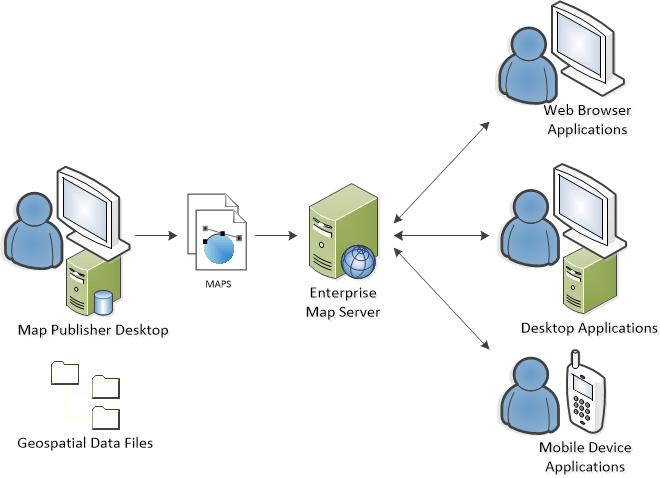
The map author builds and styles maps using geospatial data files on the network and then publishes the maps to the Enterprise Map Server where it is made available to other users on the Intranet / Internet.
Capabilities
With Map Publisher Desktop on your computer you can:
- Catalog And Index Geospatial Data On Your Network
- Visualize Pixels, Geometry And Metadata
- Create Derived Geospatial Data Products
- Convert File Formats And Coordinate Systems
- Store and Retrieve Geospatial Data In The Cloud
- Create And Style Maps And Tile Caches
- Publish Maps To The Internet Via KML, WMS, WMTS And XYZ Web Services
- Publish Maps To Mobile Devices Using XYZ, GeoPackage and MBTiles Tile Caches
Formats
The following geospatial data file formats are supported in Map Publisher Desktop:
- ARC Digitized Raster Graphics .gen, .thf
- Arc Info ASCII Grid .arc
- ArcInfo Binary Coverage .e00
- ArcInfo Binary Grid .adf
- Digital Terrain Elevation Datasets .dt0, .dt1, .dt2
- ENVI Labelled Raster .dat
- Erdas Imagine Images .img
- ESRI Shapefile Format .shp
- GeoPackage SQLite Extensions .gpkg
- Generic Mapping Tools Vectors .gmt
- GPS Exchange Format .gpx
- Joint Photographic Experts Group 2000 .jp2, .j2k, .jpc
- Mapbox Tiles .mbtiles
- MapInfo TAB and MIF .tab, .mif
- Maptech BSB Nautical Charts .kap
- Multi-resolution Seamless Image Database .sid
- National Imagery Transmission Format .ntf
- Raster Product Format a.toc
- S57 IHO Electronic Nautical Chart .000
- Shuttle Radar Topology Mission Height File Format .hgt
- Tagged Image File Format .tif, .tiff
- USGS ASCII DEM and CDED .dem
- USGS Digital Ortho Quad .doq, .doqq
- USGS Spatial Data Transfer Vector .DDF
- Virtual Raster Format .vrt
Coordinate Systems
Map Publisher Desktop supports 3868 different spatial reference systems as defined by the EPSG standards group and users can also define their own systems.
Server Systems
The Map Publisher Desktop application is seamlessly integrated with the server components in Map Publisher Professional and is designed to be used as a personal or shared map publishing system. Map Publisher Professional has four auxillary server components. The server components are:
- Parallel Processing Server
A group of Windows Services that distribute tasks across many computers in order to create map products faster
- Spatial Library Server
A Windows Service that stores a collection of one or more catalogs that contain metadata about the geospatial data files on your network - Personal Map Server
A lightweight HTTP server that publishes maps and tile caches via WMS, WMTS, KML and XYZ tile service protocols - Enterprise Map Server
A set of services deployed under Microsoft IIS HTTP server that publishes maps and tile caches via WMS, WMTS, KML and XYZ tile service protocols
Parallel Processing Server
Parallel Processing Server allows you to distribute map publishing tasks across many computers in order to process and prepare data more quickly. Parallel Processing executes many tasks, simultaneously on many computers. A task is an atomic unit of work within the overall process. For example: Creating a single tile is an atomic unit of work for a process that creates a tile cache. Or, extracting metadata from an image file is an atomic unit of work for a process that interrogates files on a network and creates a raster catalog of the image metadata. Parallel Processing Server enables you to harness the maximum computing power from all your hardware resources to get all your tasks done faster.
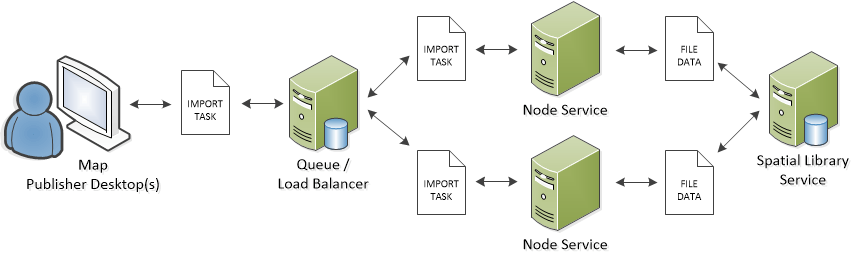
Parallel Processing Server is comprised of three Windows Services that work in concert to distribute tasks. The Map Publisher Desktop Application submits tasks to the Queue Service for processing where the tasks are placed into a First In First Out (FIFO) queue. Tasks are processed in the order they are received and are made available to the Load Balancer Service for distribution to the Worker Node Services. Tasks are classified in a way that ensures the optimal use of hardware resources in order accelerate time to completion. The more Node Services that are deployed to different computers means more tasks you can process in parallel. The Map Publisher Desktop application has a Task Docking Window that allows the user to monitor and manage the tasks.
The diagram below illustrates how tasks travel through the parallel processing system from Map Publisher Desktop to the Node Services and back.
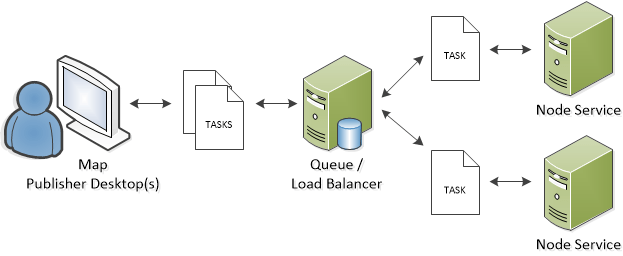
The services can be deployed together on a single computer or distributed across many computers. To get started using Parallel Processing Server and determine what deployment strategy is best for you read the Desktop, Server and How To sections of this help guide. Additional information on how to use Parallel Processing Server can be found in the Parallel Processing Server help guide.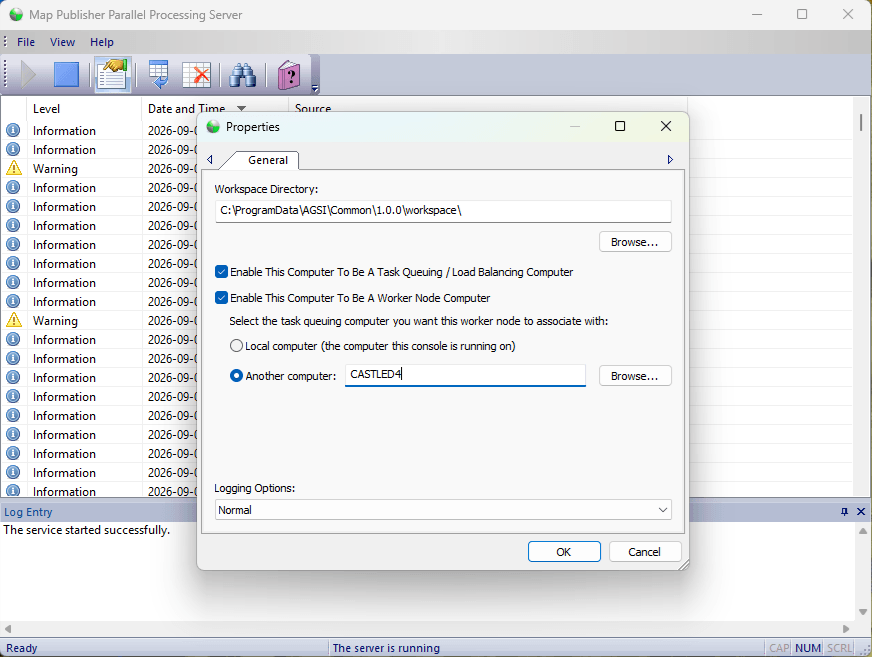
Spatial Library Server
Spatial Library Server allows you to index and organize your geospatial data so it's fast and easy to manage using the Map Publisher Desktop application. Spatial Library Server is a collection of one or more catalogs that contain metadata about the geospatial data files on your network. A catalog is a collection of metadata for a group of geospatial files that describes what the files are and where they are located on a map. For example: A Raster Catalog named Landsat could have an inventory of all the Landsat imagery on your network and using Map Publisher Professional you could quickly see footprints and imagery on the map that could be selected for creating a large mosaic.
To start using the library server, users must import data into the library using the library import features in Map Publisher Desktop. The diagram below illustrates how a library import task travels through the parallel processing system from Map Publisher Desktop to the Library Service in a distributed deployment. The same workflow occurs when all services are deployed on the same machine.
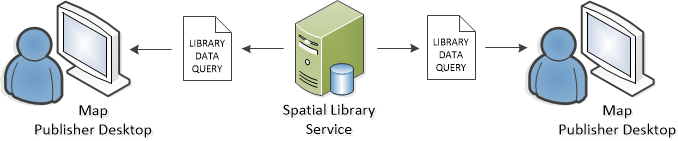
After data has been imported into the library, users can visualize footprints, metadata, geometry and / or pixels in the Map Publisher Desktop application. Users can select data for processing using one of several advanced selection tools. Data can be sorted by one or more attribute fields in the metadata. Catalog datasets can be styled and organized on a per user basis and default styles can be applied to shared libraries. The diagram below depicts multiple users accessing a shared Spatial Library Service.
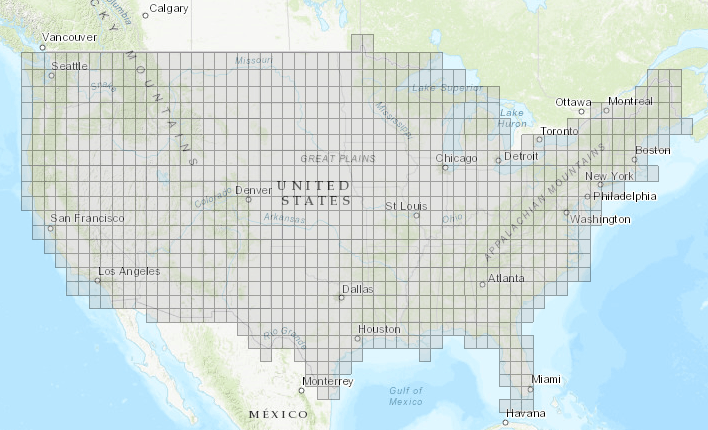
The screenshot below shows imagery footprints on the map in Map Publisher Desktop from a catalog dataset stored in the Spatial Library Service:
To learn more about using Spatial Library Server see Importing And Viewing Data with Spatial Library Server. 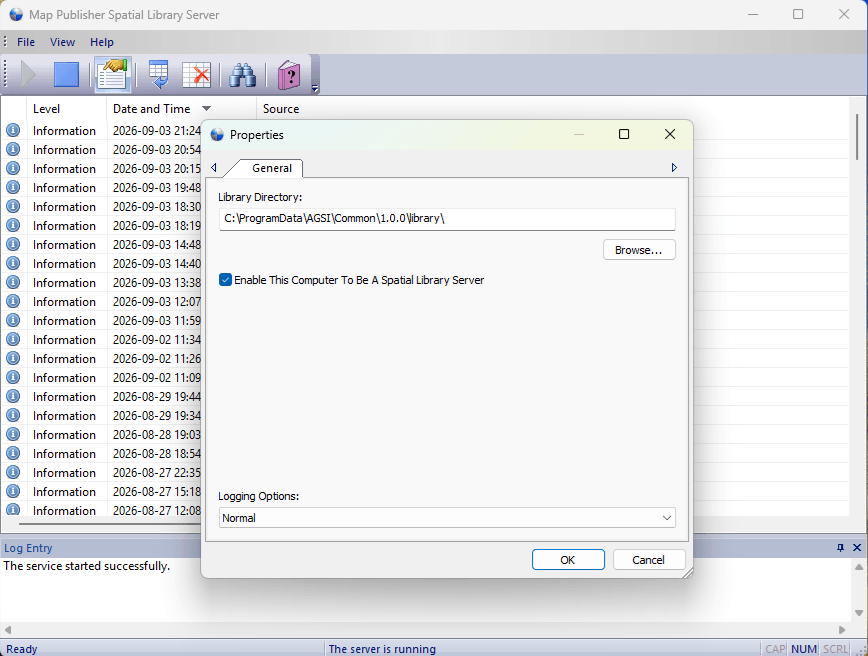
Personal Map Server
Personal Map Server allows users to publish maps to client applications via WMS, WMTS, KML and XYZ tile service protocols using a lightweight http server. Users author maps using Map Publisher Desktop and then deploy them to the Personal Map Server so other map users on your Intranet / Internet can access them. Personal Map Server is primarly intended to be used on the Intranet and is an optional feature of the Map Publisher Desktop installation. For Enterprise Map Server deployments (Internet) it is highly recommended to use the Enterprise Map Server component of the Map Publisher Professional installation program. The Enterprise Map Server component runs under Microsoft IIS Server which is a robust http server and has many features that go beyond the scope of the Personal Map Server.
At the core of Personal Map Server is an http server that conforms to the HTTP / 1.0 protocol standard. The http server is part of the Personal Map Server Desktop application and can only run only while the desktop application is open. This is intentional because Personal Map Server was designed to be an easy alternative to running a full blown http server like Microsoft IIS on every map authors workstation. The server is useful for previewing maps before they are published to Enterprise Map Server and to share content easily with other trusted users on the Intranet.
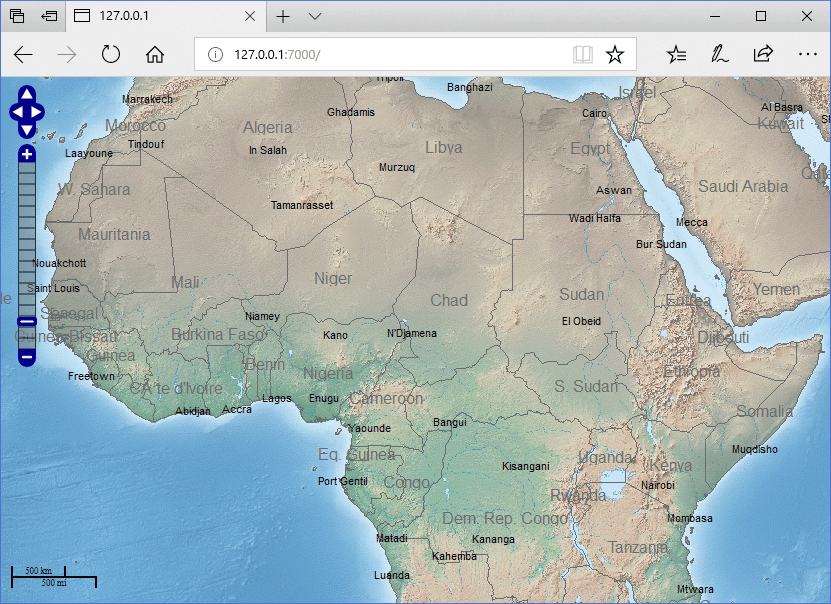
The screenshot below shows a Natural Earth dataset published using the Personal Map Server XYZ service and rendered with an OpenLayers browser application.
The http server by itself is a fairly fast and scalable web server that can deliver static content (files) much like any other web server although it only supports the GET, POST and HEAD command which makes it pretty simple. The real power of Personal map Server is implemented in the FastCGI modules that come with the server and are described in more detail below. The FastCGI protocol is a fast, scalable and fault tolerant protocol that enables the http server to run as quickly and as stable as possible. The http server is responsible for controling the lifespans of the CGI and FastCGI modules and directing http traffic to the appropriate handler. Users can expand the functionality of the server by placing their own content and services under the http server Home, Cgi-Bin or Virtual Directory paths and the server will deliver or execute the content. There are four FastCGI map services that are responsible for delivering map content and they are listed below:
- OGC Keyhole Markup Language Service (KML)
An image tile service that deliveres KML and PNG or JPEG files that Google Earth, Google Maps and other applications and / or services that can consume KML formatted content. - OGC Web Mapping Service (WMS)
An image service that delivers XML and PNG or JPEG files to geospatial applications and services that can consume WMS services like ESRI ArcMap. - OGC Web Map Tile Service (WMTS)
A tiled image service that delivers XML and PNG or JPEG files to geospatial applications and services that can consume WMTS services like ESRI ArcMap. - OSM Map Tile Service (XYZ)
A tiled image service that delivers PNG or JPEG files to geospatial applications and services that can consume XYZ services like the web based OpenLayers map GUI application.
Note: OGC stands for Open Geospatial Consortium which is an international geospatial standards commitee. To learn more about the OGC please visit their website.
Note: OSM stands for Open Street Map which is a open repository of rasterized vector content. To learn more about the OSM please visit their website.
To learn more about using Personal Map Server see Publishing Data with Personal Map Server. 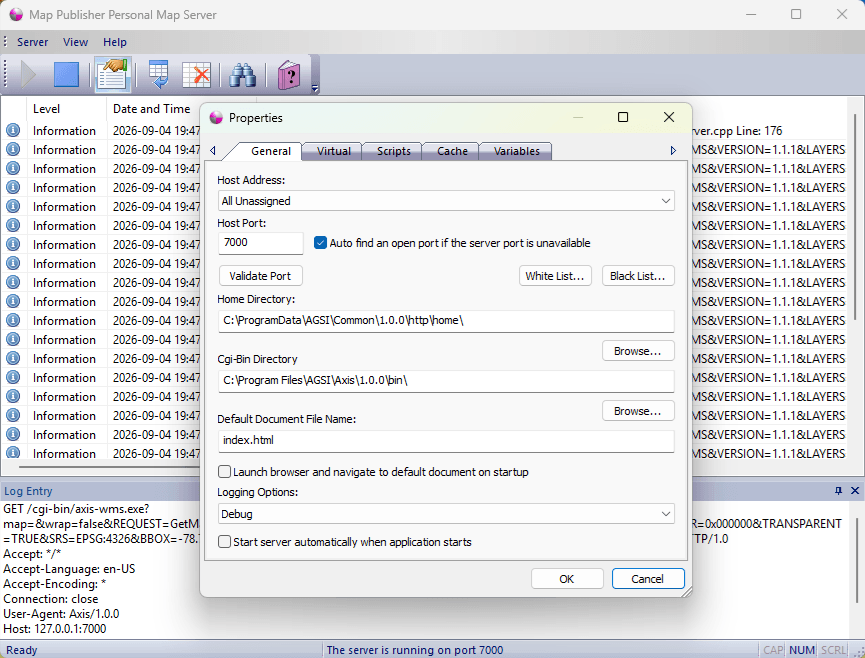
Enterprise Map Server
Enterprise Map Server allows users to publish maps to client applications via WMS, WMTS, KML and XYZ tile service protocols using Microsoft IIS http server. Microsoft IIS server is a robust http server and has many features that go beyond the scope of the Personal Map Server. Enterprise Map Server is an optional feature of the Map Publisher Desktop installation and will automatically enable Microsoft IIS when installed if not already enabled. Users author maps using Map Publisher Desktop and then deploy them to the Enterprise Map Server so other map users on your Intranet / Internet can access them. For Enterprise Map Server deployments (Internet) it is highly recommended to use the Enterprise Map Server component of the Map Publisher Professional installation program.
At the core of Enterprise Map Server is an http server that conforms to the HTTP / 1.0 and HTTP / 1.1 protocol standards. The http server is a Windows Service application and can continue running when all other users are logged off and is intended to run uninterrupted for long periods of time. The http server by itself is a fast and scalable, full featured web server but the real power of Enterprise Map Server is implemented in the FastCGI modules that are installed as part of Map Publisher Professional installer package. The FastCGI protocol is a fast, scalable and fault tolerant protocol that enables the map services to run as quickly and as stable as possible. The http server is responsible for controling the lifespans of the FastCGI modules and directing http traffic to the appropriate handler.
The screenshot below displays the "Handler Mappings" list that is part of the "Internet Information Service (IIS) Manager" Desktop application that is optionally installed with Microsoft IIS. During the installation of Enterprise Map Server the four FastCGI processes that start with "Axis" are installed.
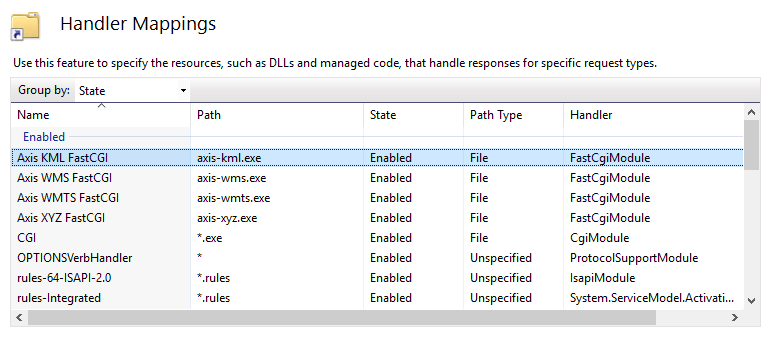
The FastCGI handlers extend the functionality of Microsoft IIS Server to support the KML, WMS, WMTS and XYZ services of Map Publisher Professional. There are four FastCGI map services that are responsible for delivering map content and they are listed below:
- OGC Keyhole Markup Language Service (KML)
An image tile service that deliveres KML and PNG or JPEG files that Google Earth, Google Maps and other applications and / or services that can consume KML formatted content. - OGC Web Mapping Service (WMS)
An image service that delivers XML and PNG or JPEG files to geospatial applications and services that can consume WMS services like ESRI ArcMap. - OGC Web Map Tile Service (WMTS)
A tiled image service that delivers XML and PNG or JPEG files to geospatial applications and services that can consume WMTS services like ESRI ArcMap. - OSM Map Tile Service (XYZ)
A tiled image service that delivers PNG or JPEG files to geospatial applications and services that can consume XYZ services like the web based OpenLayers map GUI application.
Note: OGC stands for Open Geospatial Consortium which is an international geospatial standards commitee. To learn more about the OGC please visit their website.
Note: OSM stands for Open Street Map which is a open repository of rasterized vector content. To learn more about the OSM please visit their website.
To learn more about using Enterprise Map Server see Publishing Data with Enterprise Map Server.
Deployment
Map Publisher Desktop and the auxilary Windows Services can be deployed on a single computer or across multiple computers on the network. In a single computer deployment scenario the desktop and server components are installed on one computer. In a multiple computer scenario the desktop application and server components are installed on seperate computers in order to harness the maximum computing power from all your hardware resources and get your tasks done faster. 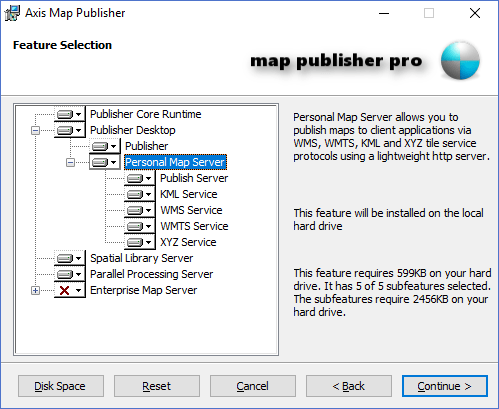
Multiple Computers
The diagram below illustrates a distributed deployment of Map Publisher Desktop and the related server components:
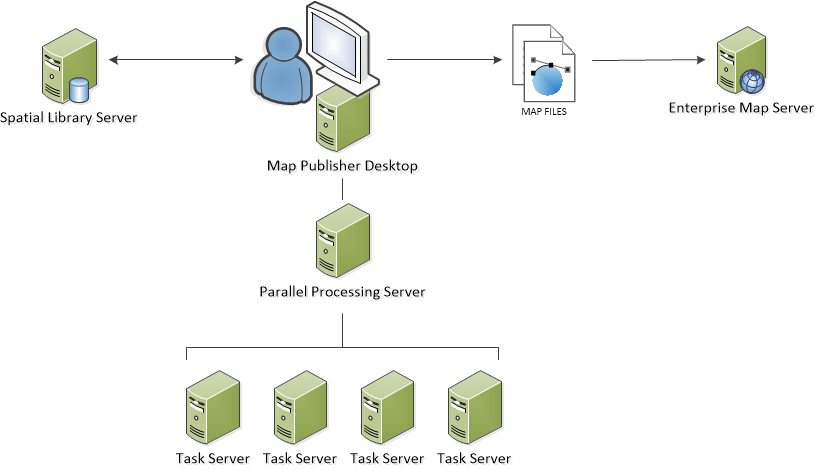
To get started using Map Publisher Desktop and determine what use-case scenario is best for you read the Desktop, Server and How To sections of this help guide. Additional information about the auxilary server components can be found in the help guides that come with those applications.
Documentation is published by LCIC with the Axis release and imported here in full. Screenshots and wording are the vendor's own.