Library Service
The library service is storage repository of metadata collected from geospatial files on your network. The service is responsible for creating, indexing, querying, editing and deleting catalogs, datasets, features and styles.
Library Service
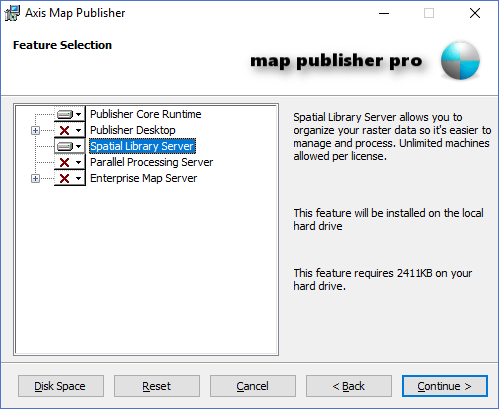
The Library Service is a Windows Service named "AGSI Axis Library Service <version> ". Windows Services are special applications that are allowed to run under a designated user account, have no user interface and can stay running when users are logged off of the computer. The library service is primarliy utilized by Map Publisher Desktop and can be installed on the same computer as Map Publisher Desktop or on a seperate computer that can be shared by many installations of Map Publisher Desktop. See the topics that start with "Deploy " in the How To section of this help documentation to learn more about Spatial Library Server deployment strategies. The Library Service is installed as part of the Spatial Library Server in the installer package as shown in the screenshot below:
Library Service Licensing
Library Service is feature of Map Publisher Professional and requires one license per installation. . To learn more please visit https://lcic.xyz/software/purchase for more information.
Library Service Configuration
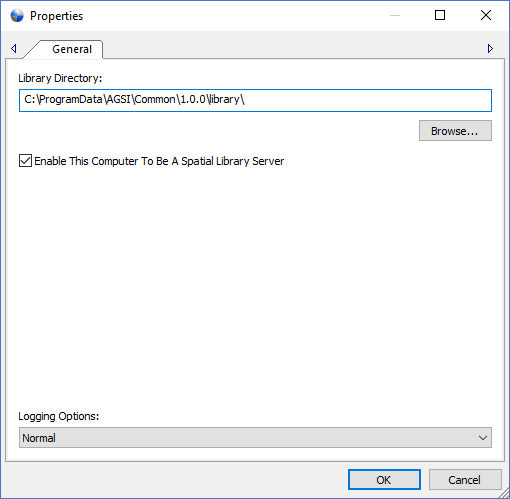
Users can configure the Library Service using the Library Desktop Properties Dialog . Users can manage additional Windows Services properties using the Microsoft Services MMC console application. To use the MMC console go to Control Panel->Administrative Services->Servicesand double click the service named "AGSI Axis Library Service <version> " to see a list of Windows Service properties. The Library Service can be enabled or disabled using either the Library Desktop application or Microsoft Services MMC console application. The screenshot below shows the option named " Enable This Computer To Be A Spatial Library Server " that enables or disables the Library service:
Library Service Event Log
The Library Service writes all system messages to the Windows Event Log and can be accessed using the Library Desktop Log Entry List or the Microsoft Event Log MMC console application. To use the MMC console go to Control Panel->Administrative Services->Event Viewer and navigate the tree control to "Applications and Service Logs" and look for the log file named "AxisLibraryServer ". Please note that the messages in this log are system messages for the service and usually do not contain information about the details of a library task. Library task details should be accessed using the Task Docking Window in Map Publisher Desktop.
Documentation is published by LCIC with the Axis release and imported here in full. Screenshots and wording are the vendor's own.