Application Overview
Spatial Library Server allows you to index and organize your geospatial data so it's fast and easy to manage using the Map Publisher Desktop application. Spatial Library Server is a collection of one or more catalogs that contain metadata about the geospatial data files on your network. A catalog is a collection of metadata for a group of geospatial files that describes what the files are and where they are located on a map. For example: A Raster Catalog named Landsat could have an inventory of all the Landsat imagery on your network and using Map Publisher Professional you could quickly see footprints and imagery on the map that could be selected for creating a large mosaic. Spatial Library Server enables you to manage all your geospatial assets easily and intelligently.
Spatial Library Server has two main components. The components are:
The Library Server stores metadata about your data and the Desktop application is used to configure the server and view and or manage the log messages from the server.
Library Desktop
Library Desktop is a simple GUI application that is installed with every instance of Spatial Library Server. You can access it from one of the links that were installed on your desktop, start menu or from the Program Files folder. Administrative privileges are required for some of the functions in the application. To read more about this requirement visit Library Desktop .
Library Server
Library Server is a Windows Service that stores and manages a library of catalogs that can be utilized by one or more users on your network. The service can be deployed on the same computer as Map Publisher Desktop or on a seperate computer and then referenced remotely using the Map Publisher Desktop application. The deployment diagrams shown below illustrate different deployment strategies:
Personal Library:
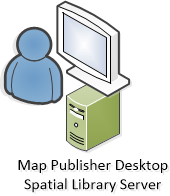
Shared Library:
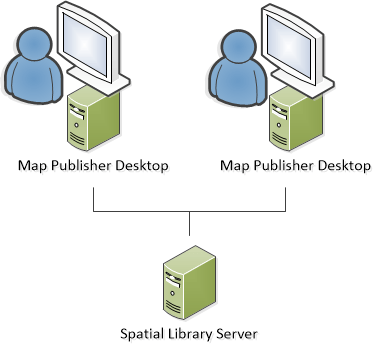
To get started using Spatial Library Server and determine what deployment strategy is best for you read the Desktop, Server and How To sections of this help guide. Additional information on how to use Map Publisher Desktop with Spatial Library Server can be found in the Map Publisher Desktop help guide.
Documentation is published by LCIC with the Axis release and imported here in full. Screenshots and wording are the vendor's own.