Properties Dialog
The desktop properties dialog window allows you to configure the behaviour of the Library Server Windows Services.
Desktop Properties Dialog
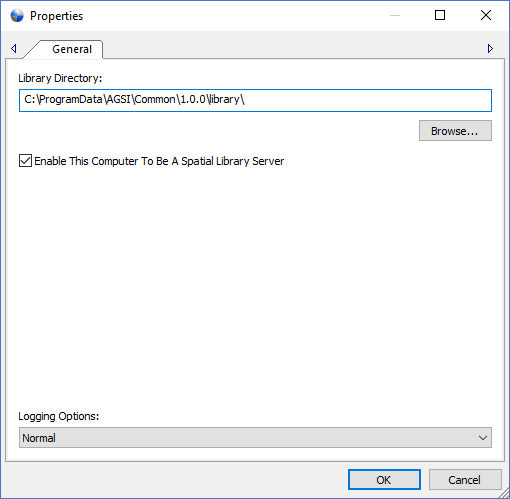
The dialog controls are:
- Library Directory
Specifies the root directory path where the Spatial Library Window Services can store a library of catalogs. The Windows Service logon credentials must have sufficient access rights to the root Library Directory for creating, reading, writing and deleting directories and files. Use the Windows Services application from the Adminstration Tools in the Control Panel to set the logon credentials for the service named AGSI Axis Library Service <version> . - Library Directory Browse
Launches a directory browse window to select the Library Directory path. - Enable This Computer to Be A Spatial Library Server
Check this option if you want this computer to be aSpatial Library Server for Map Publisher Professional Desktop applications. A Spatial Library Server is a computer that stores a library of catalogs that contain metadata about your geospatial data. In a shared deployment of Spatial Library Server you should select this option on only one computer and designate the other computers to be client workstations that associate with the Spatial Library Computer. In a personal deployment all services should be enabled on the client machine. By selecting or deselecting the option the Library Service will both be enabled or disabled accordingly. - Logging Options
The logging option influences how the Spatial Library Server Window Service logs its processing steps. The three possible logging options are Normal, Trafiic and Debug. Normal is recommended when the system is running under normal circumstances and the log entries will be limited with only high level information such as stop, start, warning and error messages. Traffic is much more verbose and will log events in more detail and should only be used when you want to get a picture of what is going on with your system but should be set back to Normal to avoid cluttering the log with useless information messages. Debug is the most verbose logging option and should be used to trouble shoot configuration and system problems.
Documentation is published by LCIC with the Axis release and imported here in full. Screenshots and wording are the vendor's own.