Menu
The desktop menu control allows you to execute the features of the application by selecting the action you wish to perform with either the mouse or keyboard.
Desktop Menu
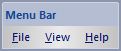
The popup menu items are:
- File
- Start
Starts the Parallel Processing Server service components. Some of the services may not be started depending on the server configuration defined in the Properties Dialog . - Stop
Stops the Parallel Processing Server service components. - Properties
Displays the Properties Dialog window. - Export
Exports the Log Entry List as a semi-colon delimited list of records in a text file. - Delete Log Items
Deletes the Log Entries from the Windows Event Log and from the Log Entry List . This action cannot be undone. - Find
Displays the Find Dialog window that is used to find Log Entries that fully or partially match the search criteria. - Exit
Exits the application and closes all windows but does not stop the Windows Services.
- Start
-
View
- Toolbars and Docking Widows
- Toolbars and Docking Widows
- Help
- Help Guide
Displays the Help Window guide (this application) for the application where you can read about Parallel Processing Server and how to use it. - About Parallel Processing Server
Displays the About Dialog window for the application where you can read about the manufacturer, copyright and find product links.
-
Documentation is published by LCIC with the Axis release and imported here in full. Screenshots and wording are the vendor's own.