Application Overview
Parallel Processing Server allows you to distribute map publishing tasks across many computers in order to process and prepare data more quickly. Parallel Processing executes many tasks, simultaneously on many computers. A task is an atomic unit of work within the overall process. For example: Creating a single png file is an atomic unit of work for a process that creates a tile cache. Or, extracting metadata from an image file is an atomic unit of work for a process that interrogates files on a network and creates a raster catalog of the image metadata. Parallel Processing Server enables you to harness the maximum computing power from all your hardware resources to get all your tasks done faster.
Parallel Processing Server has two main components. The components are:
The Parallel Server does the parallel processing work and the Desktop application is used to configure the server and view and or manage the log messages from the server.
Parallel Desktop
Parallel Processing Desktop is a simple GUI application that is installed with every instance of Parallel Processing Server. You can access it from one of the links that were installed on your desktop, start menu or from the Program Files folder. Administrative privileges are required for some of the functions in the application. To read more about this requirement visit Parallel Desktop .
Parallel Server
Parallel Processing Server has three Windows Services that work in concert to distribute tasks across multiple computers on your network. The three services are:
- Queue Service
A Multi-Node Task Queuing Service. - Load Balancer Service
A Multi-Node Task Load Balancing Service. - Node Service
A Multi-Process Task Node Service.
The services can be deployed together on a single computer or distributed across many computers. The deployment diagrams shown below illustrate different deployment strategies:
Single Computer:
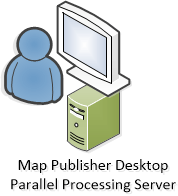
Two Computers:
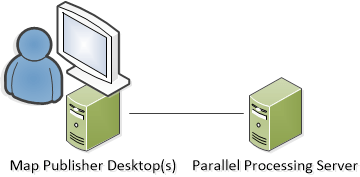
Many Computers:
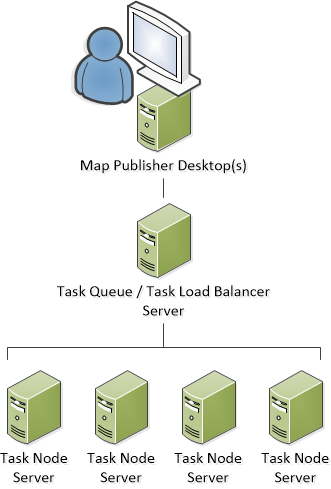
To get started using Parallel Processing Server and determine what deployment strategy is best for you read the Desktop, Server and How To sections of this help guide. Additional information on how to use Map Publisher Desktop with Parallel Processing Server can be found in the Map Publisher Desktop help guide.
Documentation is published by LCIC with the Axis release and imported here in full. Screenshots and wording are the vendor's own.