KML Service
The KML service is a FastCGI process that runs under the http server and delivers map content as Google KML.
OGC Keyhole Markup Language Service (KML)
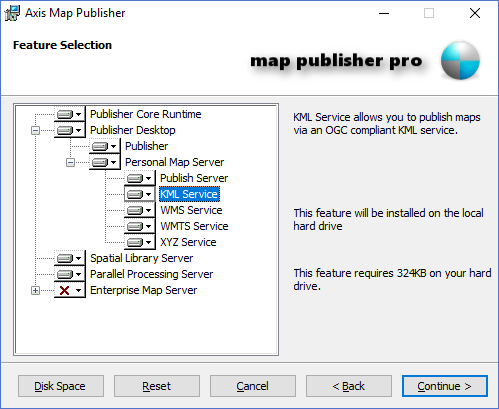
The KML Service is a FastCGI service named" axis-kml.exe " and is located in the default Cgi-Bin directory post install. The KML Service produces KML Super Overlays for each map that is published using the Map Publisher Desktop application. The KML Service is installed as part of the Personal Map Server in the installer package as shown in the screenshot below:
OGC Keyhole Markup Language Service (KML) Usage
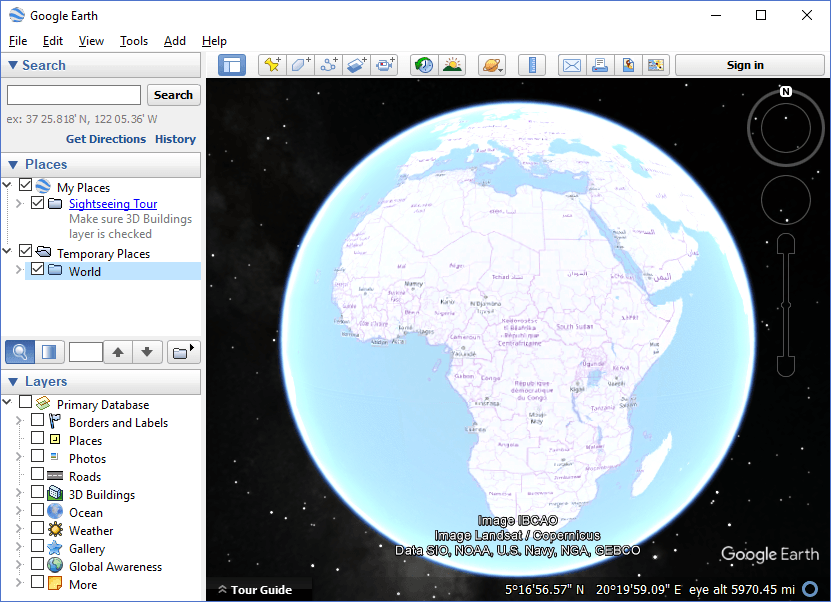
Author and publish a map to the Personal Map Server using the Map Publisher Desktop application. After publishing the map, open your browser and type in the url pattern "http://[HOST ADDRESS]:[HOST PORT]/cgi-bin/axis-kml.exe/[MAP TITLE] " and hit enter. The parameter "[MAP TITLE]" at the end is the Title of the map file deployed under the http server. If you leave that parameter blank the server will first look for a file named default.axis and return that map, otherwise it will return the map with a title that is first in an alphabetical list. When prompted by the browser to open the KML file returned by the request select Google Earth and click OK. Google Earth should open up and automatically add the map to the Temporary Places folder.
The screenshot below shows OpenStreetMap tiles proxied through the Personal Map Server KML service to the Google Earth Desktop application as a KML Super Overlay document.
To learn more about authoring and publishing maps to Personal Map Server using Map Publisher Desktop please refer to the help guide included with Map Publisher Professional.
Documentation is published by LCIC with the Axis release and imported here in full. Screenshots and wording are the vendor's own.