General Page
The desktop properties dialog window general page allows users to configure the behaviour of the Map Server Http Service.
Desktop Properties Dialog General
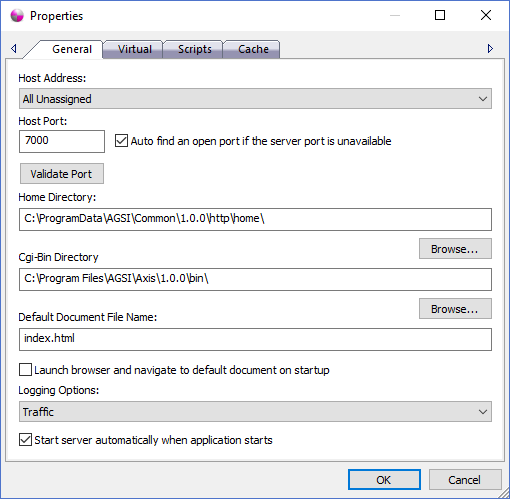
The dialog controls are:
- Host Address
Specifies the host IP address that the server should accept http requests on. The drop down list displays the IP addresses for all network adaptors loaded on the machine. Users can select a specific network adaptor address, 127.0.0.1 to only accept requests from the local computer or "All Unassigned" which will accept requests on any of the network adaptor IP addresses available. - Host Port
Specifies the host port number to accept http requests on. Valid port numbers range from 0 to 65535 but typically port numbers less than 1024 are reserved for special types of network services. Port 80 is the standard port number for most http servers but the Personal Map Server defaults to 7000 so not to conflict with any other potential services that may be running on the machine. - Auto find an open port if the server port is unavailable
Check this option if you want the http server to automatically find the next open port number to bind to on startup if the Host Port specified is already being used by another service. When the http service initializes the server will attempt to bind to the Host Port specified. If the port is unavailable the server will start checking additional ports by incrementing the Host Port number until it finds an open port or reaches the maximum port number of 65535. - Validate Port
The Validate Port button control attempts to bind to the port specified and validate that another service is not already using it. A message box window will be displayed alerting the user whether the port is available or not. If the server is already running when the button is clicked it will report that the port is already in use. - Home Directory
The Home Directory text box specifies a directory path where the root folder of the default website resources reside. This directory typically contains html, css, javascript, png, jpeg, sub-directories and other files that comprise a website. If a request is made to the IP address and port without any other directory or file name specified after it, such as "http://127.0.0.1:7000 " , the http server will return the file contents of the file name specified in the "Default Document File Name" text box.
Important Note: Please be aware that all files and folders under the "Home Directory" directory path will be available to any person or machine that can access the IP address while the http service is running so it is highly recomended that you don't place any sensitive or private files under that location. For further protection of Personal Map Server please refer to the help guide documentation for Microsoft Firewall Service on the Microsoft website. A Firewall allows and blocks access to IP Addresses, port numbers and protocols in a secure way to help ensure unwanted visitors don't access services they are not allowed to use. - Home Directory Browse
The Browse button located directly under the Home Directory text box displays a directory browse dialog window that allows the user to select a home directory path. - Cgi-Bin Directory
The Cgi-Bin Directory text box specifies a directory path where the root folder of the website scripts and executables reside. This directory contains exe files that dynamically produce html, css, javascript, png, jpeg and other website content on demand. Requests made to the Cgi-Bin, such as "http://127.0.0.1:7000/cgi-bin/axis-xyz.exe/<map title>/0/0/0.png " will execute the application specified and return the contents back to the requestor.
Important Note: Please be aware that all executable files under the "Cgi-Bin Directory" directory path that are also specified on the Scripts Page of this dialog will be available for any person or machine that can access the IP address while the http service is running to execute. It is highly recomended that you don't place any executable files under that location if you don't want them to get invoked. For further protection of Personal Map Server please refer to the help guide documentation for Microsoft Firewall Service on the Microsoft website. A Firewall allows and blocks access to IP Addresses, port numbers and protocols in a secure way to help ensure unwanted visitors don't access services they are not allowed to use. - Cgi-Bin Directory Browse
The Browse button located directly under the Cgi-Bin Directory text box displays a directory browse dialog window that allows the user to select a cgi-bin directory path. - Default Document File Name
The Default Document File Name text box specifies the file to be returned when a request to the http server does not specify the cgi-bin directory path or any other file or folder name. Typically the file name is something like index.html or default.html but it can be whatever file name you desire. This file must exist in the root of the Home Directory path. - Launch browser and navigate to default document on startup
Check this option if you want the Personal Map Server to attempt to launch your default web browser and navigate to the web page specified in the Default Document File Name text box when the http service is started. This is a convient feature when using the Auto find open port option so you don't have to type in the Host Address and Host Port number into the web browser address bar manually. - Logging Options
The logging option influences how the Personal Map Server logs its processing steps. The three possible logging options are Normal, Trafiic and Debug. Normal is recommended when the system is running under normal circumstances and the log entries will be limited with only high level information such as stop, start, warning and error messages. Traffic is much more verbose and will log events in more detail and should only be used when you want to get a picture of what is going on with your system but should be set back to Normal to avoid cluttering the log with useless information messages. Debug is the most verbose logging option and should be used to trouble shoot configuration and system problems. - Start server automatically when application starts
Check this option if you want the http service to automatically start when the Personal Map Server Desktop application is started. This is a convience feature so the user doesn't have to start the service after the application starts.
Documentation is published by LCIC with the Axis release and imported here in full. Screenshots and wording are the vendor's own.