Scripts Page
The desktop properties dialog window scripts page allows users to specify CGI and FastCGI executable files that are allowed to execute in the Cgi-Bin directory while the http service is running. Common Gateway Interface (CGI) and Fast Common Gateway Interface (FastCGI) scripts are executables that produce dynamic website content on demand. Personal Map Server provides the FastCGI modules listed below as part of the Personal Map Server installation package depending on your feature selection. The modules listed below are responsible for the KML, WMS, WMTS and XYZ services that are available as part of this product.
Desktop Properties Dialog Scripts
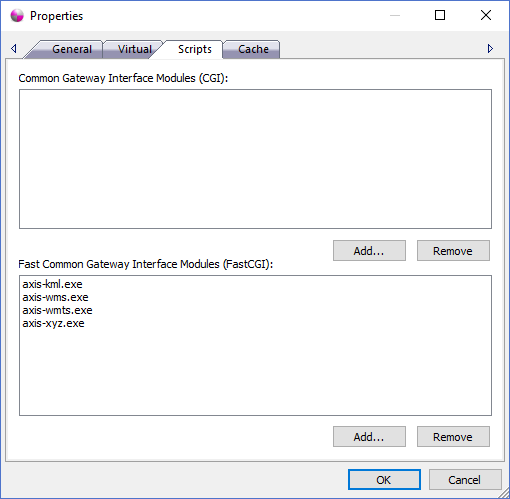
The dialog controls are:
- Common Gateway Interface Modules (CGI)
Displays a list of CGI executable file names that exist in the Cgi-Bin Directory that are allowed to be executed while the http service is running. To request a CGI module from a web browser address bar a user would specify an address like "http://127.0.0.1:7000/cgi-bin/<CGI MODULE NAME>" to invoke the process. CGI executable files must exist in the Cgi-Bin directory as specified on the General Page .
Important Note: Please be aware that all executable files under the "Cgi-Bin Directory" directory path that are also specified in the Common Gateway Interface Modules (CGI) list control above will be available for any person or machine that can access the IP address while the http service is running to execute. It is highly recomended that you don't place any executable files under that location if you don't want them to get invoked. For further protection of Personal Map Server please refer to the help guide documentation for Microsoft Firewall Service on the Microsoft website. A Firewall allows and blocks access to IP Addresses, port numbers and protocols in a secure way to help ensure unwanted visitors don't access services they are not allowed to use. - Common Gateway Interface Modules (CGI) - Add...
When the Add... button is clicked the Script File Name Dialog window is displayed. The file name specified in the text box is added to the Common Gateway Interface (CGI) list control when the OK button is clicked. The script file name must exist in the Cgi-Bin Directory specified on the General Page before adding it to the list.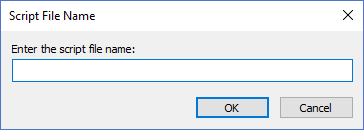
- Common Gateway Interface Modules (CGI) - Remove
When the Remove button is clicked the Script File Name that is selected in the Common Gateway Interface (CGI) list control is removed from the list and will no longer be available to service requests after the changes are saved and the http service is restarted. The CGI file name is removed from the list but it is not deleted or moved from the Cgi-Bin directory. - Fast Common Gateway Interface Modules (FastCGI)
Displays a list of FastCGI executable file names that exist in the Cgi-Bin Directory that are allowed to be executed while the http service is running. To request a FastCGI module from a web browser address bar a user would specify an address like "http://127.0.0.1:7000/cgi-bin/<FastCGI MODULE NAME>" to invoke the process. FastCGI executable files must exist in the Cgi-Bin directory as specified on the General Page .
Important Note: Please be aware that all executable files under the "Cgi-Bin Directory" directory path that are also specified in the Fast Common Gateway Interface Modules (FastCGI) list control above will be available for any person or machine that can access the IP address while the http service is running to execute. It is highly recomended that you don't place any executable files under that location if you don't want them to get invoked. For further protection of Personal Map Server please refer to the help guide documentation for Microsoft Firewall Service on the Microsoft website. A Firewall allows and blocks access to IP Addresses, port numbers and protocols in a secure way to help ensure unwanted visitors don't access services they are not allowed to use. - Fast Common Gateway Interface Modules (CGI) - Add...
When the Add... button is clicked the Script File Name Dialog window is displayed. The file name specified in the text box is added to the Fast Common Gateway Interface (FastCGI) list control when the OK button is clicked. The script file name must exist in the Cgi-Bin Directory specified on the General Page before adding it to the list. - Fast Common Gateway Interface Modules (CGI) - Remove
When the Remove button is clicked the Script File Name that is selected in the Fast Common Gateway Interface (FastCGI) list control is removed from the list and will no longer be available to service requests after the changes are saved and the http service is restarted. The FastCGI file name is removed from the list but it is not deleted or moved from the Cgi-Bin directory.
Documentation is published by LCIC with the Axis release and imported here in full. Screenshots and wording are the vendor's own.